Loading...
Searching...
No Matches
LogView
Русская версия · Scroll controls · Control examples
Use LogView either for recent in-memory output or for a bounded view of an external model. ui::logView("Ready") owns a rolling journal; ui::logView(ui::logFile("application.log")) reads a regular UTF-8 file on the application's background executor. Both follow the tail by default. The file size does not determine the amount of retained text. See LogView configuration and API.
File-backed log
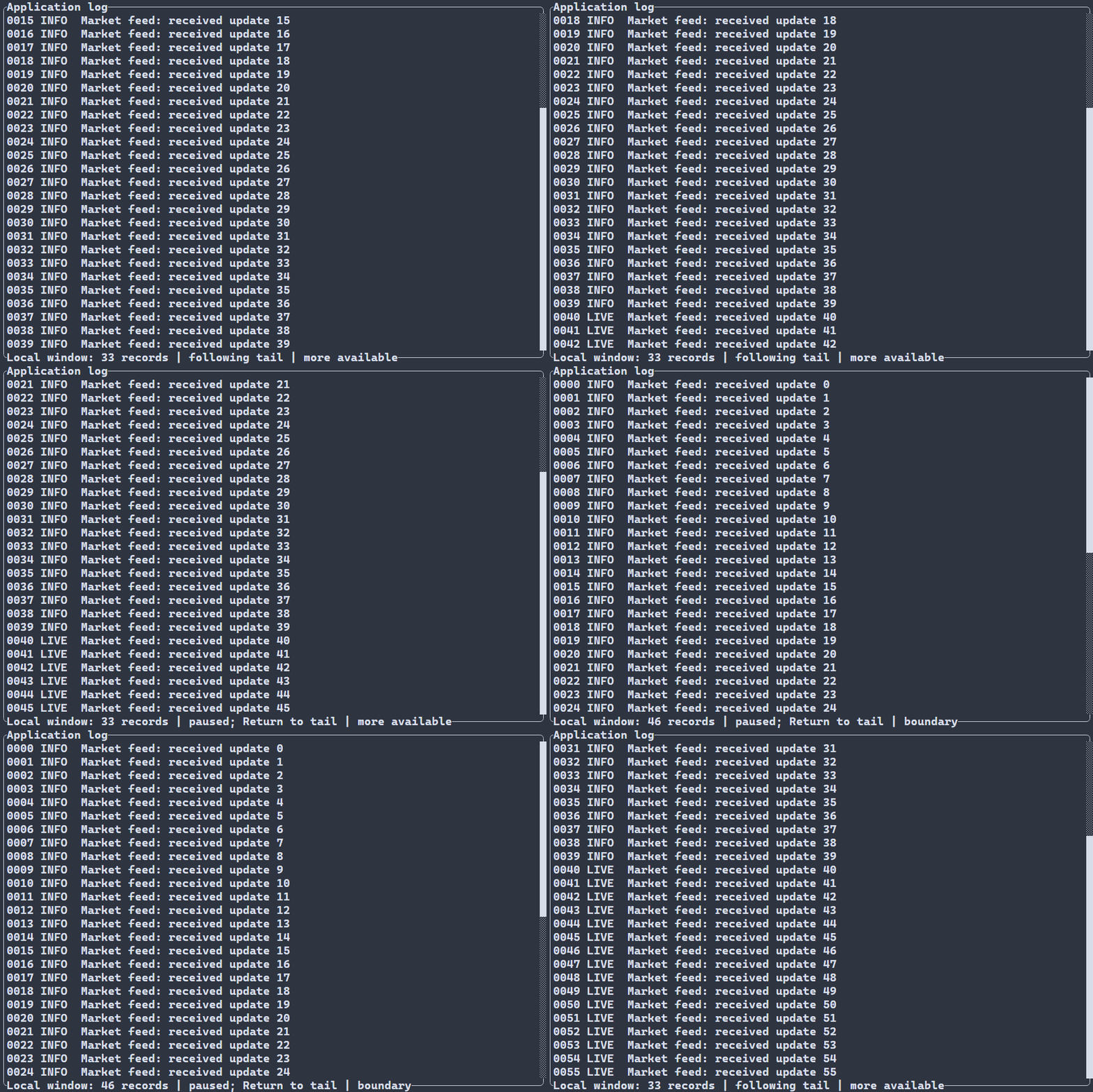
Following a local file, pausing to read older records, and returning to the live tail
The recording uses a local writer that appends generated records to the file.
Place a UTF-8 application.log in the working directory, build portals_file_log_example with PORTALS_BUILD_EXAMPLES=ON, and run it in a terminal. The view opens at the available tail and observes appended records. PageUp/PageDown, the wheel and scrollbar pause following while you read older records. Return to tail resumes following; F10 or Ctrl+C exits.
// Copyright (c) 2026 ttldtor.
// SPDX-License-Identifier: BSL-1.0
#include <portals/ui.hpp>
int main() {
using namespace portals;
auto log = ui::logFile("application.log");
// clang-format off
return ui::scene(ui::logView(log).framed("rounded", "Application log"))
| ui::onKey("F10 | Ctrl+C", ui::quit)
| ui::runApp();
// clang-format on
}
The scene owns the view and cancels its work when the node is removed. File opening, reads, UTF-8 validation, grapheme parsing and wrapping use the existing application executor. The UI installs an immutable prepared window. Creating ui::logFile(...) performs no file access; setup and worker failures use the runner's typed diagnostics, including the native file operation and error code.
The default external view limits are 512 logical records, 1 MiB of record payload and 64 KiB per record, subject to a shared 8 MiB source/preparation budget. These are cache limits, not limits on the file or its total record count. The file model uses 16 KiB read blocks and a 32 KiB record limit by default; FileLogOptions allows records up to 64 KiB. An overlong record returns a typed error without silently truncating it. One enormous record still requires a different segmented text model.
Include <portals/log_file.hpp> when using the rich log.fileModel() API. metadata() returns byte extent and generation, readBytes() reads a caller-sized buffer, and findLiteral() searches file bytes in bounded steps with explicit continuation. Call these methods on a worker, never in a blocking UI callback. The view does not turn byte extent into a row count or retain a dense file index. seekLogByte(tree, node, offset) accepts a record's starting byte offset; seekLogRow(tree, node, ordinal) applies to finite model bindings with a known logical row count. Their units are distinct.
Finite snapshots can use the opt-in <portals/ui_log_source_model.hpp> adapter and a worker-side text codec. The original model remains available for its other operations; the adapter adds read-only display delivery. Generic cursor sources can provide WindowProvider<LogLine> through ui::logSource(...) without claiming a total row count.
Local regular seekable files are supported. Rotation and observed truncation start a new generation; existing pins stay immutable. Concurrent rewriting is not a filesystem snapshot: a truncate-and-regrow entirely between observations may be indistinguishable from growth. Cancellation is cooperative between reads; an operating-system call on a remote filesystem can still block. Selection, clipboard, a search toolbar and persistent storage are not supplied by this view.
Switching models
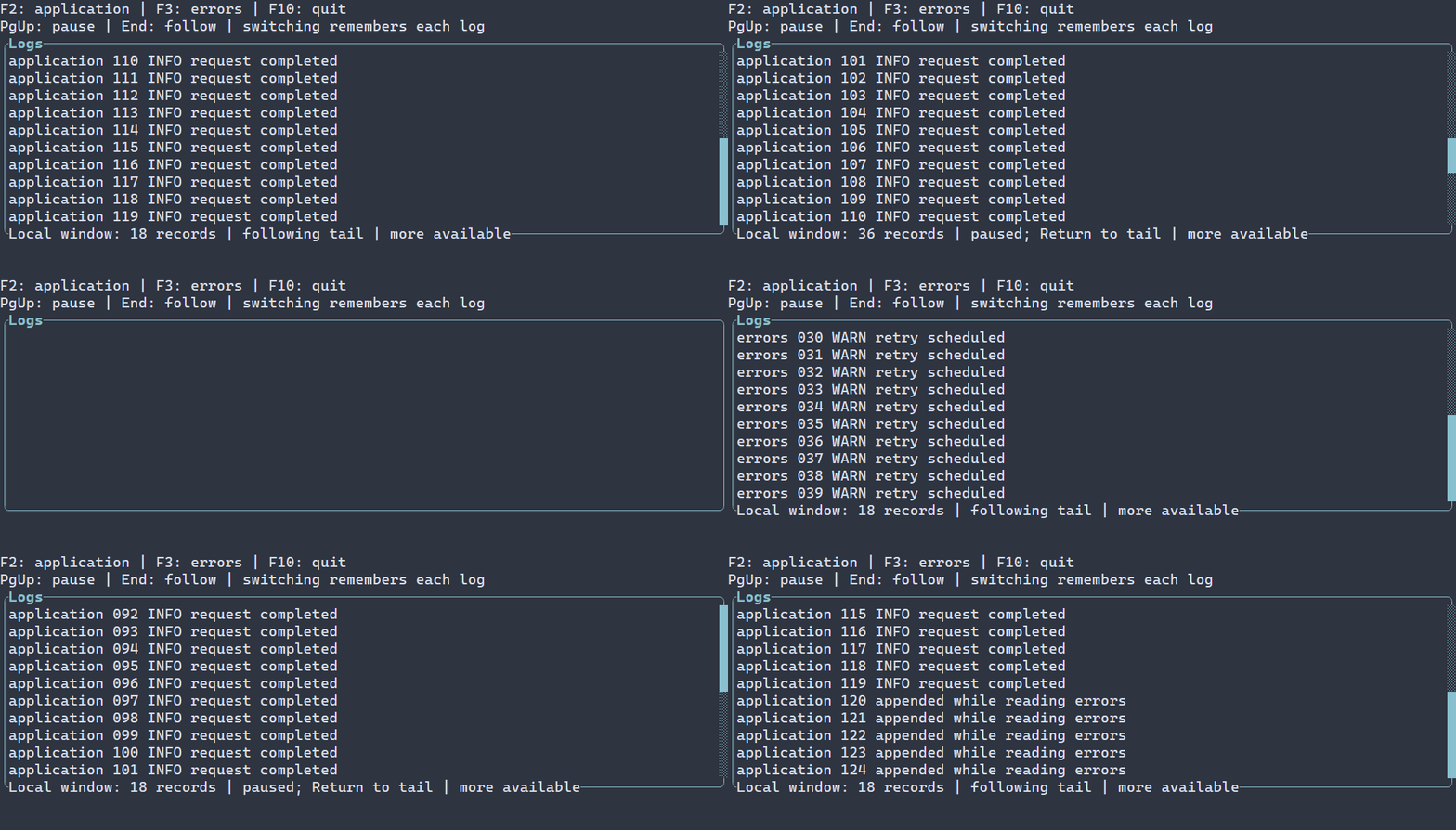
Switching the same LogView from application.log to errors.log and back
The recording pauses application.log at record 092, switches to errors.log, appends records in the background, and returns to the same paused record. End then follows the new tail. The local recording fixture supplies both files and the appended records.
Keep a ui::Ref<LogView> and call log.model(source) from a UI handler to replace the source of the existing view. Files are one source family, not a requirement of LogView.
Create UTF-8 application.log and errors.log in the working directory. F2 and F3 switch between them without recreating the control:
// Copyright (c) 2026 ttldtor.
// SPDX-License-Identifier: BSL-1.0
#include <portals/ui.hpp>
int main() {
using namespace portals;
ui::Ref<LogView> log;
auto application = ui::logFile("application.log");
auto errors = ui::logFile("errors.log");
// clang-format off
return ui::scene(ui::vbox(
ui::label("F2: application | F3: errors | F10: quit"),
ui::label("PgUp: pause | End: follow | switching remembers each log"),
ui::logView(log, application).framed("rounded", "Logs").height(12)))
| ui::theme(nordTheme())
| ui::onKey(key::F2, [=] { log.model(application); })
| ui::onKey(key::F3, [=] { log.model(errors); })
| ui::onKey("F10 | Ctrl+C", ui::quit)
| ui::runApp();
// clang-format on
}
Typed Widget observation; explicit composite specializations reuse their existing weak facades.
Definition ui_ref.hpp:761
bool model(const LogSource &source, std::source_location origin=std::source_location::current()) const
Definition ui_ref.hpp:1089
StyleSheet nordTheme()
The same operation accepts ui::logSource(provider) for a worker-safe WindowProvider<LogLine>. For an existing immutable finite model, include <portals/ui_log_source_model.hpp> and pass ui::logSource(snapshot) for string records, or ui::logSource(snapshot, codec) for domain records. Keep the original model for its richer operations; replacing the display binding does not convert it into a file model or require an exact total count.
Replacement preserves the control's identity, Ref, focus, geometry and styles, and releases the old displayed window. A source with bookmark support remembers its logical reading position and whether following was enabled. PageUp pauses following; End resumes it. Switch to another log and back with the same retained descriptor: a paused view returns to its saved record even after an append; a following view resumes at the available tail. Files are opened and resolved on the existing worker, not in the UI handler.
The default checkpoint cache belongs to this view's navigation session, with a 256 KiB metadata budget and a 4096-byte limit per bookmark. It retains no source pages or model objects. Views navigate independently by default. Use an explicit LogNavigation from ManagedScene::logNavigation() in LogSourceViewConfig when a replacement view should reuse an existing session. These bounds limit saved metadata, not the source length or its number of records. A checked reset(resource) forgets the saved entry without moving an active view or requesting a redraw; later ordinary preparation or navigation may save its current position again.
File bookmarks verify native file identity and a bounded record witness. Observed rotation, truncation or an incompatible rewrite can make a position unavailable; a path alone does not establish continuity. Arbitrary changes between observations cannot always be detected. Custom providers can supply LogBookmarkProvider without declaring a total count. A missing capability or lost history is a recoverable LogRestoreStatus, not a fabricated nearest row or an implicit switch to following. Cancelled work from a previous binding cannot install text or report a stale error into the new binding.
log.model(source) reports an admission failure through the scene's error collector. Use log.setModel(source) when the handler needs to inspect the std::expected result itself. An invalid descriptor leaves the current binding unchanged. A later read failure belongs to the newly accepted binding and follows the ordinary runner error policy; admission does not promise that a file exists or can be read. A rolling in-memory view can also be bound to an external source; its earlier journal is not retained as an undoable model switch.
Use ordinary input handlers for replacement. Like other scene mutations, setModel returns WOULD_BLOCK during an onError notification; the error callback observes the failure and cannot reenter scene mutation.
A read-only non-file model
The following complete application formats finite immutable domain records on the application worker. F2/F3 replace the display source; the same LogView and Ref stay alive. This adapter knows its row count and provides positional reads. For an unknown extent, implement WindowProvider<LogLine> directly instead of inventing a total for ModelSnapshot.
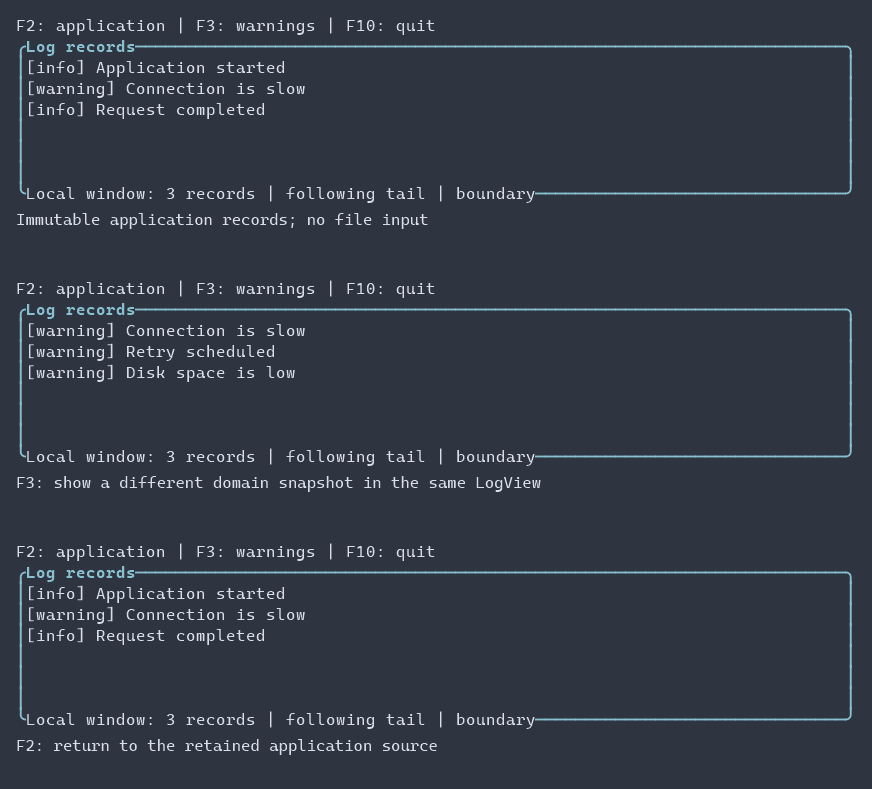
One LogView displays application records or warnings from non-file snapshots
// Copyright (c) 2026 ttldtor.
// SPDX-License-Identifier: BSL-1.0
#include <portals/ui.hpp>
#include <portals/ui_log_source_model.hpp>
#include <portals/ui_style.hpp>
#include <array>
#include <memory>
#include <memory_resource>
#include <string_view>
using namespace portals;
enum class Severity {
INFO,
WARNING
};
struct LogRecord {
Severity severity;
std::string_view message;
};
// Finite immutable domain records are supplied without filesystem access.
// These records borrow string literals, which outlive the snapshot and worker reads.
public:
explicit LogSnapshot(std::array<ModelRow<LogRecord>, 3> rows) : ModelSnapshot(1, rows.size()), rows_(rows) {
}
ModelRows<LogRecord> read(RowRange range) const override {
return {RangeState::READY, std::span(rows_).subspan(range.first, range.count), {}};
}
private:
const std::array<ModelRow<LogRecord>, 3> rows_;
};
int main() {
ui::Ref<LogView> log;
ui::LogSource application;
ui::LogSource warnings;
// The codec runs on a worker and only writes to its supplied workspace string.
auto codec = [](const LogRecord &record, std::pmr::string &out) {
out.append(record.severity == Severity::WARNING ? "[warning] " : "[info] ");
out.append(record.message);
};
// clang-format off
return ui::scene([&](ManagedScene &) {
application = ui::logSource<LogRecord>(std::make_shared<LogSnapshot>(std::array{
ModelRow<LogRecord>{{1, 1}, {Severity::INFO, "Application started"}},
ModelRow<LogRecord>{{2, 1}, {Severity::WARNING, "Connection is slow"}},
ModelRow<LogRecord>{{3, 1}, {Severity::INFO, "Request completed"}}}), codec);
warnings = ui::logSource<LogRecord>(std::make_shared<LogSnapshot>(std::array{
ModelRow<LogRecord>{{1, 1}, {Severity::WARNING, "Connection is slow"}},
ModelRow<LogRecord>{{2, 1}, {Severity::WARNING, "Retry scheduled"}},
ModelRow<LogRecord>{{3, 1}, {Severity::WARNING, "Disk space is low"}}}), codec);
return ui::vbox(
ui::label("F2: application | F3: warnings | F10: quit"),
ui::logView(log, application).framed("rounded", "Log records").height(8));
})
| ui::theme(nordTheme())
| ui::onKey(key::F2, [&] { log.model(application); })
| ui::onKey(key::F3, [&] { log.model(warnings); })
| ui::onKey("F10 | Ctrl+C", ui::quit)
| ui::runApp();
// clang-format on
}
Additive lifecycle owner over one existing Application subtree. UI affine and nonmovable....
Definition managed.hpp:530
Immutable list/table provider storage, independent of view/source lifetime. Implement read as bounded...
Definition model.hpp:94
Owning deferred external log binding; construction performs no file I/O. Copies share the provider an...
Definition ui_log_view.hpp:48
A typed domain row and its stable identity; a table uses a typed record as T.
Definition model.hpp:55
Rolling in-memory log
The following append and retention contracts apply to the rolling journal. Its defaults retain 512 records and 256 KiB, admit batches up to 16 KiB and records up to 4 KiB. External sources use the separate limits above; append and clear are rejected for an externally bound view.
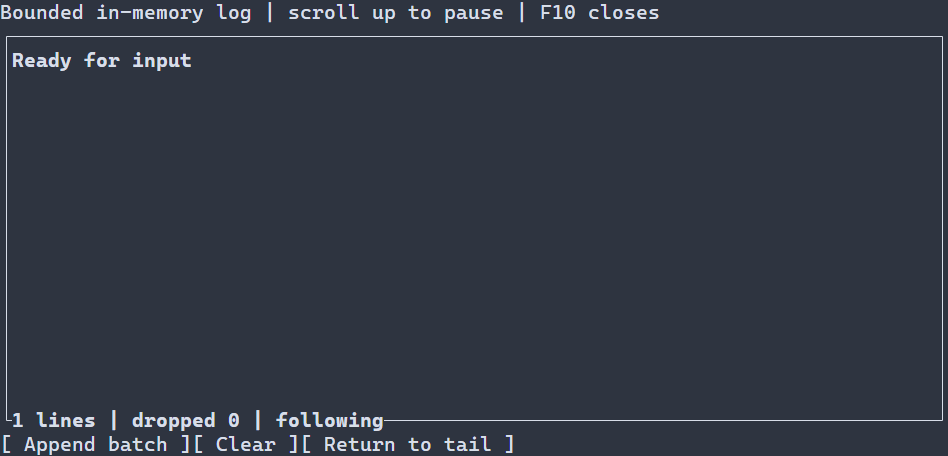
Resource example with the initial log record and controls
Styling reference
LogView paints its text, fill and footer with normal, :focused, or :disabled (disabled takes precedence). Its manual ControlStyle supplies defaults beneath the cascade. Use foreground, background (#RRGGBB), bold, italic, and underline (true or false). A state-free rule applies to all variants; min-width requires a state-free selector. See the cascade and size constraints.
The inherited scroll frame and scrollbar have separate part colors and glyph settings: see the scrollbar styling reference and frame styling. Their paint attributes inherit the common resolved style when omitted. The right and bottom frame sides must remain enabled for the scrollbar and footer.
LogView:focused { foreground: #d0e8f0; scrollbar-thumb-foreground: #62b4d7; }
LogView is a scene-owned, bounded plain-text journal for showing recent output. Append complete batches of UTF-8 text; the control splits them into records, keeps the newest records within configured limits, wraps each record on grapheme boundaries, and paints only its prepared visible rows. Its default height is flexible, so it uses the available vertical space; an explicit size policy can change that. It has no child widget per record and does not perform terminal I/O, file I/O or background work.
At an unchanged width, append reuses the existing wrap ranges and wraps only newly retained records. It still copies the bounded row descriptors; total append cost is not independent of the retained row count. A width change rebuilds the wrap ranges. Hiding the view does not discard its retained data or make append a background operation. Send expensive data acquisition or transformations through an appropriate provider before applying a short UI update.
Ordinary C++ program
Build the portals_log_view_example example with PORTALS_BUILD_EXAMPLES=ON, then run it in a terminal. The view starts with Ready. Each Append batch click adds one numbered three-record batch; the longer Unicode record wraps as the terminal gets narrower. The example retains at most 12 records. Clear removes the current records, and Return to tail resumes following. Scrolling upward also pauses following while new records are retained and counted. F10 exits through the standard runner.
// Copyright (c) 2026 ttldtor.
// SPDX-License-Identifier: BSL-1.0
#include <portals/ui.hpp>
#include <format>
int main() {
using namespace portals;
ui::Ref<LogView> log;
auto scene = ui::scene(ui::vbox(
ui::label("Recent events | wheel/PageUp reads history | F10 closes"),
ui::logView(log, "Ready\n", {.limits = {.maxLines = 12}}).height(8),
ui::hbox(
ui::button("Append batch").onClick([log, batch = 0]() mutable {
log.append(std::format("Batch {}\nПринят пакет\n界 cafe\u0301 👩💻 — a longer event record wraps as the terminal becomes narrower.\n", ++batch));
}),
ui::button("Return to tail").onClick([log] {
log.tail();
}),
ui::button("Clear").onClick([log] {
log.clear();
}))));
return scene
| ui::onKey(key::F10, ui::quit)
| ui::runApp();
}
bool clear(std::source_location origin=std::source_location::current()) const
Definition ui_ref.hpp:1366
bool append(std::string_view bytes, std::source_location origin=std::source_location::current()) const
Definition ui_ref.hpp:1064
bool tail(std::source_location origin=std::source_location::current()) const
Definition ui_ref.hpp:1334
The example keeps its sample messages in memory. It does not read or write files or claim to preserve output after the process exits.
Loading LogView from a scene resource
A scene resource can declare the built-in LogView by name. C++ obtains typed refs and connects ordinary button handlers; the resource contains no executable callbacks and needs no manual control registration.
// Copyright (c) 2026 ttldtor.
// SPDX-License-Identifier: BSL-1.0
#include <portals/ui.hpp>
int main() {
using namespace portals;
constexpr auto NEXT_BATCH = "A complete batch\nkeeps its own line boundaries";
auto scene = ui::scene(R"scene(
scene {
VBox {
Label { "Bounded in-memory log | scroll up to pause | F10 closes" }
LogView#log {
text="Ready for input" maxLines=128 maxBytes=65536
maxBatchBytes=8192 maxRecordBytes=4096
}
HBox {
Button#append { "Append batch" }
Button#clear { "Clear" }
Button#tail { "Return to tail" }
}
}
}
)scene", {.format = ui::SceneResourceFormat::CONFIGURATION});
return scene
| ui::onClick(append, [=] {
log.append(NEXT_BATCH);
})
| ui::onClick(clear, [=] {
log.clear();
})
| ui::onClick(tail, [=] {
log.tail();
})
| ui::onKey(key::F10, ui::quit)
| ui::runApp();
}
One-line button; registration is an explicit caller-owned ActionBinding.
Definition controls.hpp:161
Native bounded plain-text log with whole-grapheme wrap and a stable reading anchor....
Definition log_view.hpp:64
DynamicRef get(std::string_view name, std::source_location origin=std::source_location::current())
The configuration properties are text, maxLines, maxBytes, maxBatchBytes, maxRecordBytes, followTail and readOnly, alongside common layout, frame and style settings. text starts empty; defaults for all four limits are listed below, followTail defaults to true, and readOnly defaults to false. The resource sample starts with one line; C++ buttons append a two-record batch, clear retained records or return to the tail. Resource values configure initial content and bounds; append operations remain C++ commands.
The vertical scrollbar uses the right frame side, and the status/Return-to-tail footer uses the bottom side. Both sides must remain enabled. Frame, title and style customization may change their appearance, but disabling either required side is rejected with typed INVALID_ARGUMENT during mount. Keep resource frame.sides.right and frame.sides.bottom enabled. There is no public post-mount frame/options setter. The resource example is the complete loaded-scene path; it does not add another control-registration or persistence layer.
Batches, records and bounds
An append is one complete batch, not a fragment of a stream. CRLF, CR and LF each separate records; CRLF is one separator. Empty records between separators are kept. A final separator ends its preceding record and does not add a phantom empty record. An empty batch is a no-op. The control does not join a partial record across separate appends.
| Limit | Default | Hard ceiling |
|---|---|---|
| Retained records (maxLines) | 512 | 8,192 |
| Retained UTF-8 payload (maxBytes) | 256 KiB | 4 MiB |
| Input batch including separators (maxBatchBytes) | 16 KiB | 256 KiB |
| One record, excluding its separator (maxRecordBytes) | 4 KiB | 64 KiB |
All limits must be positive. maxRecordBytes cannot exceed either maxBytes or maxBatchBytes. A setting above its hard ceiling is rejected; the control does not silently clamp it. maxBytes counts retained record payload without line separators, while the batch limit includes separators. Empty records count toward maxLines but contribute no payload bytes.
Each batch is validated and staged before publication. Invalid UTF-8, a limit violation or an allocation failure rejects the whole batch and leaves retained records and counters unchanged. A successful batch keeps the newest records that fit both retained limits. If an oversized record count displaces records from the same batch, those records are still counted as accepted input and dropped output. Drop-oldest is a successful retention policy, not a partial-input error.
The wrap index stores numeric record/byte ranges for every visual row, so a rewrap still scans retained source text and its graphemes; that work is not limited to the viewport. Retained source records stay within the configured limits, while the owning prepared GraphemeText paint cache contains only rows intersecting the visible viewport. The limits bound records, payload and index size, but do not give an exact process-RSS guarantee: grapheme metadata, record objects, visible caches and staged old/new state also use memory.
Wrapping and reading position
LogView wraps at its current text width without splitting a grapheme. A single grapheme wider than the viewport is consumed once and clipped by the existing terminal text policy. Zero-sized or hidden views draw no rows and preserve the logical follow state or reading anchor until a usable viewport is prepared.
Following the tail is enabled by default. Set followTail=false to start paused at the first record and visual row; the footer shows Return to tail. A deliberate scroll away from the bottom also pauses following; reaching the bottom or choosing Return to tail resumes it. Programmatic ui::Ref<LogView>::setOffset(ScrollAxis::VERTICAL, ...) changes are deliberate navigation too. Appending while paused preserves the reading anchor and increments the newWhilePaused count. The footer reports retained records and dropped history; while paused it also reports new records and offers Return to tail.
The anchor is a record identity plus a grapheme byte boundary at the first visible row. Resizing rewraps records and places the view at the visual row that contains that boundary. If retention evicts the anchored record, the view moves to the first surviving record and the dropped count makes that loss visible. The anchor is not an absolute visual row number, so a width change does not pretend that the old row number still identifies the same text.
Append, clear and status
ui::Ref<LogView> provides short append(bytes), clear() and tail() commands for ordinary event handlers. They return bool and report technical failures through the existing scene diagnostic collector. appendBatch(bytes), clearLog() and followTail() are checked alternatives that return typed results without automatically reporting technical failures. A successful appendBatch returns an owning LogAppendReceipt with accepted, dropped and retained record counts and retained payload bytes.
status() returns an owning LogStatus containing retained lines and bytes, cumulative dropped lines, records accepted while following is paused, and the follow/saturation flags. Saturating counters stop at their representable maximum instead of wrapping; the flags identify a saturated total. The observation contains scalar values only and does not retain records or the control. Clear removes retained records, resets drop and paused-new counters, preserves record-ID history and resumes following.
Mount a usable control through ManagedScene::logView(...) or ui::logView(...). Direct WidgetTree::emplace<LogView> alone is insufficient, even if its base ScrollArea lease is initialized: it does not register the managed entry's scroll-intent observer and preparation path. Commands and measurement on such a node return typed INVALID_ARGUMENT. There is no standalone raw-control setup path.
The scene owns the log records. A Ref<LogView> observes its control and does not prolong its lifetime. Append copies caller bytes before successful return. Programmatic append, clear and tail commands remain allowed when the control is hidden, disabled or configured read-only; read-only blocks user navigation. Commands follow the existing UI-thread, outside-frame and live-owner checks. Later layout or render failure does not turn a successful append into a failed admission: its records have already been retained.
The rolling append path does not frame an incremental byte stream or provide filtering, search, selection, clipboard copy or persistent storage. Use the external-source path above for file-backed display.