Loading...
Searching...
No Matches
Application notifications
Use notifications for short status messages while work continues. ui::NotificationCenter observes the scene-owned queue; application callbacks and expiry determine actions. Defaults and keyboard/pointer behavior are described below. See notification options and API.
For a loaded scene, register a code-owned native factory with its semantic schema; the resource does not supply executable callbacks. See resource registration.
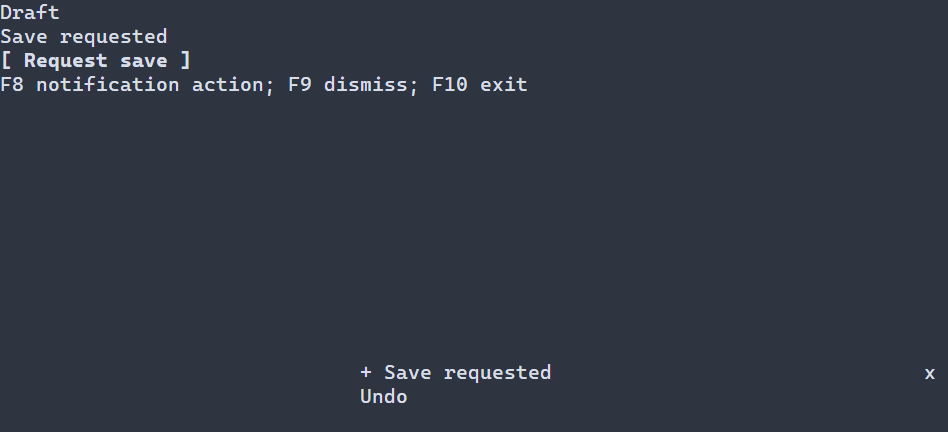
Resource-body example with a Save requested notification and Undo action
Styling reference
Notifications resolve logical Toast parts using the normal style. Severity classes are .toast-info, .toast-success, .toast-warning, .toast-failure; .toast-message, .toast-action, .toast-dismiss and .toast-indicator style the respective parts. Part defaults come from the resolved severity style, with indicator foreground and alert background supplied by its options before the indicator rule. These are paint subjects, not independent widgets.
Use foreground, background (#RRGGBB), bold, italic, and underline (true or false). Rules and layers follow the style cascade; common min-width constraints concern widget layout rather than these paint subjects. Indicator glyph and timing are options, not PSS properties.
Toast.toast-warning { foreground: #e0b040; }
Toast.toast-action { bold: true; }
Use ui::notifications(center, content) to show short messages while the user continues editing the content. The scene owns the queue, actions and expiry timer; ui::NotificationCenter is a copyable observing handle. Clicking a notification does not automatically move focus from an editor.
A complete application
The resource-body example loads the body from configuration while the notification center and actions remain in C++. Build portals_docs_toast_resource with tests enabled and run it in a terminal.
// Copyright (c) 2026 ttldtor.
// SPDX-License-Identifier: BSL-1.0
#include <portals/ui.hpp>
int main() {
using namespace portals;
// clang-format off
return [] {
ui::NotificationCenter notices;
auto scene = ui::scene(ui::notifications(
notices,
ui::resource(R"(scene {
VBox {
LineEdit { "Draft" }
Label#status { "Editing" }
Button#saveRequest { "Request save" }
Label { "F8 notification action; F9 dismiss; F10 exit" }
}
})",
ui::SceneResourceOptions{.format = ui::SceneResourceFormat::CONFIGURATION})));
return std::move(scene)
| ui::onClick(save, [notices, status] {
status.text() = "Save requested";
notices.show(ui::toast("Save requested").success()
.action("Undo", [status] { status.text() = "Undo requested"; }));
})
| ui::onKey("F8", [notices] { notices.activateLatest(); })
| ui::onKey("F9", [notices] { notices.dismissLatest(); })
| ui::onKey("F10", ui::quit);
} | ui::runApp();
// clang-format on
}
One-line button; registration is an explicit caller-owned ActionBinding.
Definition controls.hpp:161
Noninteractive Unicode label; text remains data, including control characters.
Definition controls.hpp:142
Copyable weak UI-affine semantic handle; the scene owns all queue, action and timer storage....
Definition toast.hpp:311
DialogCommandResult show(const ToastMessage &message, std::source_location origin=std::source_location::current()) const
DialogCommandResult dismissLatest(std::source_location origin=std::source_location::current()) const
DialogCommandResult activateLatest(std::source_location origin=std::source_location::current()) const
DynamicRef get(std::string_view name, std::source_location origin=std::source_location::current())
Explicit resource-loader configuration; no process-global registry or locale. Configure without concu...
Definition ui_scene_resource.hpp:487
The button below records a save request and offers an application action. It does not write a file. F8 activates the latest eligible action, F9 dismisses a message and F10 exits. These keys are explicit application bindings.
// Copyright (c) 2026 ttldtor.
// SPDX-License-Identifier: BSL-1.0
#include <portals/ui.hpp>
int main() {
using namespace portals;
// clang-format off
return [] {
ui::NotificationCenter notices;
ui::Ref<Label> status;
ui::Ref<Button> save;
return ui::scene(ui::notifications(
notices, ui::column(
ui::lineEdit("Draft"),
ui::label(status, "Editing"),
ui::button(save, "Request save"),
ui::label("F8 notification action; F9 dismiss; F10 exit"))))
| ui::onClick(save, [notices, status] {
status.text() = "Save requested";
notices.show(ui::toast("Save requested").success()
})
| ui::onKey("F8", [notices] { notices.activateLatest(); })
| ui::onKey("F9", [notices] { notices.dismissLatest(); })
| ui::onKey("F10", ui::quit);
} | ui::runApp();
// clang-format on
}
Typed Widget observation; explicit composite specializations reuse their existing weak facades.
Definition ui_ref.hpp:761
TextProperty text(TextResolver resolver={}, std::source_location origin=std::source_location::current()) const
Definition ui_ref.hpp:1968
Use the installed-package setup to build this source as an ordinary application linked to portals::core. The source-tree target is portals_docs_toast, available with PORTALS_BUILD_TESTS=ON.
Notifications work without a dialog host. When the application also has dialogs, put the notification wrapper inside the host body:
auto content =
ui::notifications(notices, ui::column(ui::lineEdit("Draft")));
auto layout = ui::overlayHost(std::move(content),
ui::dialog(details, "Details", ui::label("Request details")));
This fragment assumes a ui::NotificationCenter notices and a ui::Ref<Dialog> details. Dialogs appear above the notification plane. The wrapper does not add intrinsic size to its content. Removing an ordinary content child keeps application notifications alive; removing their wrapper or closing the scene closes the center.
Message severity
Choose presentation directly on an owning message: ui::toast("Saved").success(). The .info(), .success(), .warning() and .error() methods select the existing INFO, SUCCESS, WARNING and FAILURE styles. The pipe forms are equivalent: ui::toast("Saved") | ui::success(). The last severity modifier wins and preserves the message's other options and actions. .error() requests failure presentation; it does not report an application error or change diagnostic policy.
Queue and expiry
| Setting | Default and meaning |
|---|---|
| NotificationOptions::capacity | 32 retained messages, including selected messages |
| maxVisible | 3 selected messages; clipping may leave fewer on screen |
| placement, maximumWidth | BOTTOM_END, 48 terminal cells |
| margin, gap | 1 cell each, reduced for small viewports |
| ToastOptions::duration | 5000 ms; std::nullopt keeps a message persistent |
| dismissOnAction | true: dismiss before entering the action |
| dedupKey | Empty disables deduplication; nonempty keys use exact case-sensitive bytes |
| refreshDeduplicated | false: retain the original payload, action, identity and deadline |
| reducedMotion | false; indicators and their alternation are separately opt-in |
Expiry starts after a completed layout first places positive clipped cells for that particular message. This is a logical frame boundary, before terminal submission. A queued or fully clipped message has no initial expiry deadline. Hiding the center or blocking it with a modal dialog suspends its timer without resetting existing absolute deadlines. Expired messages are removed when the center becomes eligible again.
By default, overflow evicts the oldest eligible pending transient message. Selected, persistent and running messages are protected. If no eligible victim exists, the new request is intentionally dropped. show(...) discards this policy receipt; use post(...) when the application needs ToastPostStatus, the adopted ToastId, or an evicted identity. REJECT_NEW instead returns a typed NODE_LIMIT error without changing the queue.
Commands, ownership and errors
show, dismiss, dismissLatest, activate, activateLatest, clear, setVisible and setReducedMotion use the existing checked short-command and diagnostic mechanism. snapshot() returns an owning immutable observation with full text, action captions, original identities and deadlines; it does not retain callbacks or the scene. Queries do not report errors automatically.
Call center commands on the UI thread. An admitted action owns its captures and data until it returns, including when it removes its own notification subtree. New admission checks current identity, visibility, enabled state and modal policy. An action can explicitly open a dialog and change focus. Action failures are reported once and are not replayed automatically.
Pre-adoption errors preserve the old queue and timer. A successful theme or style layer commit remains committed if later notification preparation fails; the last notification picture is retained with a typed preparation error. Notifications do not replace an application's error journal or install automatic error popups.
The existing diagnostic policy may stop the application after an error. Retrying a notification command does not resume a stopped or closed host; recovery applies while the owning services remain live.
Styles and optional indicators
The logical Toast subjects expose .toast-info, .toast-success, .toast-warning, .toast-failure, .toast-message, .toast-action, .toast-dismiss and .toast-indicator. These are notification paint parts, not separately focusable controls. Apply rules through the existing style layers. Changes to their resolved paint values request paint only when the result changes.
Messages are clipped at grapheme boundaries; snapshots retain their complete text. The optional indicator must occupy one cell. Its background alternation defaults to a 500 ms period when explicitly enabled. Reduced motion keeps a static indicator. Expiry and alternation share one committed Scheduler timer; preparation may stage one replacement. A stable center with no timed work does not schedule animation or request recurring redraws.