Loading...
Searching...
No Matches
Present data loading states
A results screen may need to show loading, then ready content or an empty result, and explain a failure with an explicit retry. ui::dataStateView presents those states around an existing content subtree: the application or supported virtual view supplies the state, and an optional callback performs retry. Pending work can show an animated indicator. The wrapper does not fetch data or virtualize content. For content that is always available and has no changing data status, use the ordinary content directly. This is the common loading/empty/error presentation pattern, without requiring a particular data source.
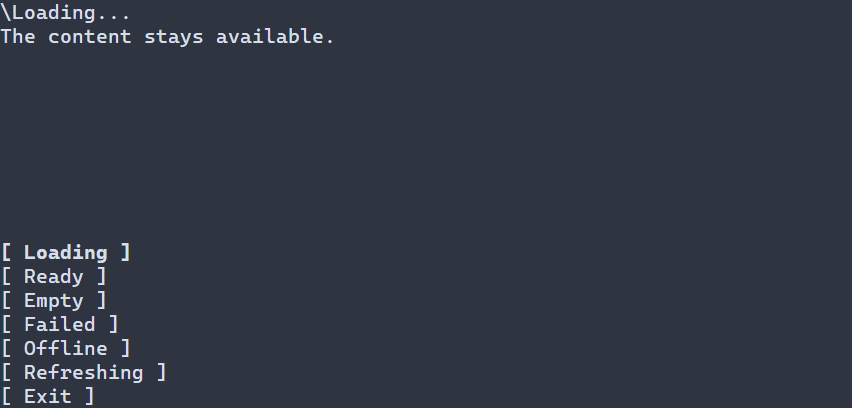
Loading presentation with content kept available.
Loading presentation with content kept available.
Run an explicit presentation
This controlled demonstration changes presentation with buttons; it does not load data or provide a retry operation. It starts ready, keeps its label visible in every state and exits with Exit or F10. A button's checked display result reaches the standard runApp diagnostics. The scene owns the controls; presentation is an observing reference.
// Copyright (c) 2026 ttldtor.
// SPDX-License-Identifier: BSL-1.0
#include <portals/ui.hpp>
int main() {
using namespace portals;
// clang-format off
return [] {
ui::Ref<DataStateView> presentation;
return ui::scene(ui::vbox(
ui::dataStateView(DataPresentation{DataPhase::READY},
ui::label("The content stays available."))
.reference(presentation),
ui::button("Loading", [presentation] {
}),
ui::button("Ready", [presentation] {
}),
ui::button("Empty", [presentation] {
}),
ui::button("Failed", [presentation] {
}),
ui::button("Offline", [presentation] {
}),
ui::button("Refreshing", [presentation] {
}),
ui::button("Exit", [] { ui::quit(); })))
| ui::onKey(key::F10, ui::quit);
} | ui::runApp();
// clang-format on
}
Typed Widget observation; explicit composite specializations reuse their existing weak facades.
Definition ui_ref.hpp:761
std::expected< void, TreeError > display(DataPresentation value, std::source_location origin=std::source_location::current()) const
Definition ui_ref.hpp:1883
@ READY
Successful nonempty content; the reserved status strip is blank.
Definition data_presentation.hpp:12
@ OFFLINE
Explicit provider connectivity state, never inferred by the control.
Definition data_presentation.hpp:16
@ REFRESHING
Pending work with provider-permitted last-good content still visible.
Definition data_presentation.hpp:17
@ FAILED
Domain failure; independent technical errors retain their typed cause.
Definition data_presentation.hpp:15
@ EMPTY
Successful content has zero logical rows.
Definition data_presentation.hpp:14
@ LOADING
Initial or viewport request is pending.
Definition data_presentation.hpp:13
Owning scalar state of one immutable presentation producer.
Definition data_presentation.hpp:21
To build this guide in the Portals source tree, enable PORTALS_BUILD_TESTS, then build and run portals_docs_data_state. For your own application, link portals::core as described in using the installed package.
ui::dataStateView(DataPresentation{...}, content) owns its presentation value. Only this mode accepts ui::Ref<DataStateView>::display or the explicit checked setDataStateView(tree, node, value) operation. Use DataContentPolicy::REPLACE in DataStateConfig when independently owned work permits hiding the body outside READY and REFRESHING. The default KEEP_BODY keeps it live.
Observe scene state
Pass a same-scene ManagedState<DataPresentation> or a read-only ManagedSource<DataPresentation> instead of the initial value. For example, inside a scene factory with a ManagedScene &owner:
.transform([](auto state) {
return ui::dataStateView(state, ui::label("Results"));
});
The producer changes its state through its existing checked set operation. display rejects both bound forms with TreeError::INVALID_ARGUMENT; binding a writable state does not give the view a writable alias.
For explicit and bound values, generation must be nonzero. A value older than the last accepted generation is ignored after thread, lifetime and frame checks. An equal generation may change phase, including pending to terminal; an equal value is a no-op. Advance the producer's generation when cancelling or superseding work: presentation cannot distinguish competing completions with the same number. The selected producer or binding remains fixed for the mounted view.
Follow a virtual view
Use the overload with only a managed VirtualList or VirtualTable recipe to follow its prepared viewport range. Given the model and formatter from the virtual list guide, replace its returned recipe with:
return ui::dataStateView(
ui::virtualList(model, [](const ModelRow<std::string> &row) {
return displayText(row.value);
}));
A typed domain row and its stable identity; a table uses a typed record as T.
Definition model.hpp:55
The wrapper reads owning status facts from the body's same successful preparation. It does not pin or query the model again, maintain a second cache or install a query subsystem. The body remains live in all phases so its existing provider callback can receive and complete work. REPLACE and display are rejected in this mode. The wrapper's fixed presentation generation of 1 is separate from model request generations and revisions.
| Prepared range | Presentation |
|---|---|
| No preparation yet, pending rows, or an active request without ready rows | LOADING |
| Ready rows with an active request | REFRESHING |
| Failed range without an active request | FAILED |
| Successful zero logical row count | EMPTY |
| Ready nonempty rows without an active request | READY |
OFFLINE is explicit domain information; the wrapper never infers it from an error message. Refreshing preserves only content the existing provider/view permits to remain ready; it does not invent stale data. An explicit retry of a failed base range retains its current request until completion or ordinary cancellation, even when indicator frames prepare the view again.
Labels, retry and failures
DataStateConfig::labels owns TextValue messages and the optional retry caption. Literal UTF-8 and resource keys use the receiving scene's width policy. Supply resolver for resource keys; resolution and text validation happen at mount, with no automatic locale subscription. To change locale, construct a new composition with the desired labels and resolver.
The standard theme applies to the status composition. messageStyle and retryStyle supply manual styles beneath theme resolution. The semantic classes are data-status, data-spinner, data-message and data-retry; see style layers for precedence.
retry is an optional owning callback returning std::expected<void, TreeError>. The retry button appears for FAILED and OFFLINE; only explicit activation calls it. For automatic views, use the body's existing retryVirtualList or retryVirtualTable operation in that callback. Pending work suppresses repeated activation. No request starts just because the strip appears, and no focus is stolen when an error appears.
A domain DataPhase::FAILED is separate from a technical failure. Invalid options, allocation failures, formatter/provider callbacks and text-resource errors retain their original typed causes through existing managed diagnostics. A technical failure does not become an offline or failed domain state. Initial mount is checked and rolls back on refusal. In own-value mode, a refused display or setDataStateView update publishes no partial status or text. This guarantee covers presentation changes; removals by application callbacks and model updates retain their own effects and existing typed error and stop policy.
The strip reserves statusRows terminal rows (default 1), including while ready. It uses one scoped one-shot timer at spinnerInterval (default 100 ms), rearmed only for visible, enabled pending content with a nonempty clip. Hidden, removed or closed views stop animation; ready and static states do not poll. Set showStatus to false to omit the strip, labels, retry button and timer. In that configuration, retry must be empty; a configured retry callback makes mount return TreeError::INVALID_ARGUMENT.
See the public data presentation declarations for settings and the declarative API for scene lifetime and error handling.
Styling reference
DataStateView is a Column composition, not a surface inheriting its colors into children. Its status parts have stable style subjects:
| Subject | Appearance |
|---|---|
| Row.data-status | Status layout; does not paint a fill itself |
| DataStateIndicator.data-spinner | One-cell pending indicator, normal/disabled |
| Label.data-message | Status message, ordinary Label styles |
| Button.data-retry | Optional retry button, normal/focused/disabled |
The root and status parts also carry the current phase class: ready, loading, empty, error, offline, refreshing. These are classes (.error), not new pseudo-states. No child ID is assumed. showStatus=false creates none of these status children. messageStyle supplies manual message/indicator defaults; retryStyle supplies retry defaults before theme/PSS overrides.
The common paint properties are foreground and background (#RRGGBB), bold, italic, and underline (true or false). Unspecified fields keep their manual defaults or lower style-layer values; an explicit false is an override. See selectors and precedence. Runtime PSS sizing accepts width, height (cells, auto, fit-content, flex(weight)) and min-width, max-width, min-height, max-height (nonnegative cells). Size rules require state-independent selectors; conflicting bounds reject the update. Only min-width of these size declarations is supported by compile-time PSS. See size policy.
The status strip reserves statusRows (default 1). DataStateLabels configures messages; indicator frames are built in, and spinnerInterval defaults to 100 ms. These are DataStateConfig settings, not status-rows or spinner PSS properties. Styling does not change the phase, hide content, start requests or invoke retry.
Label.data-message.error { foreground: #e65a5a; }
DataStateIndicator.data-spinner { foreground: #62b4d7; }
Button.data-retry:focused { bold: true; }