Loading...
Searching...
No Matches
Dialogs and overlay hosts
Use a dialog when content needs an overlay, either modal or nonmodal. A scene-owned dialog is controlled through ui::Ref<Dialog>; its input and close behavior are described below. Configuration resources can declare supported dialog presentation, while executable handlers remain C++. See Dialog options and API.
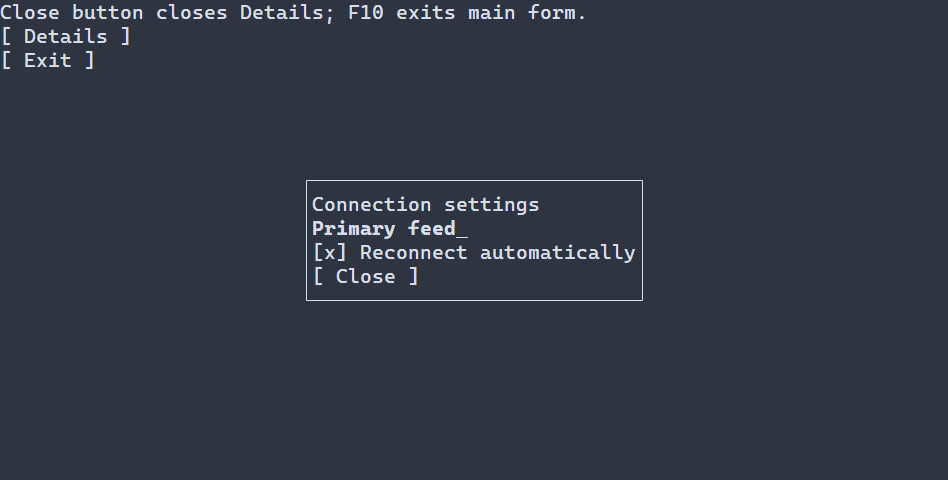
Resource example with the Connection settings modal dialog
Styling reference
A dialog is a composition: its panel is Border.dialog-panel, its close control is Button.dialog-close, and the standard content uses Label.dialog-title and Column.dialog-body. Style each target independently. Panel painting uses the Border enabled/disabled appearance; buttons use their ordinary control states. DialogOptions::frame accepts BorderOptions: glyphs defaults to Unicode with ASCII width fallback, glyphSelection selects a base map, and maxPaintCells defaults to 16384. It does not expose FrameOptions::pattern, sides, or customGlyphs; the ordinary dialog panel keeps its fixed single-line outline and four sides. Its title label and frame-close button are separate controls, not a FrameOptions::title decoration.
Common foreground, background (#RRGGBB), bold, italic, underline (true or false) and state-independent min-width follow the cascade and size constraints. The panel supports the frame-line-, frame-title-, and frame-ends- paint prefixes with those five attributes, inheriting unspecified attributes from its common style; see frame styling.
Border.dialog-panel { frame-line-foreground: #62b4d7; }
An overlay host keeps one main body and registered dialog layers in the same retained tree. Opening changes visibility, input admission and focus without a second event loop or scene reconstruction. Closed dialogs stay mounted and retain their child controls' state.
A complete modal form
For a scene-resource version, guide_dialog_resource.cpp declares the host and dialog in configuration and binds actions in C++. Build portals_docs_dialog_resource with tests enabled and run it in a terminal.
// Copyright (c) 2026 ttldtor.
// SPDX-License-Identifier: BSL-1.0
#include <portals/ui.hpp>
int main() {
using namespace portals;
// clang-format off
return [] {
auto scene = ui::scene(R"(scene {
OverlayHost {
VBox {
Label { "Close button closes Details; F10 exits main form." }
Button#detailsOpen { "Details" }
Button#exit { "Exit" }
}
Dialog#details {
title = "Connection settings"
VBox {
LineEdit { "Primary feed" }
CheckBox { text = "Reconnect automatically"; state = CHECKED }
Button#close { "Close" }
}
}
}
})",
ui::SceneResourceOptions{.format = ui::SceneResourceFormat::CONFIGURATION});
return std::move(scene)
| ui::onClick(detailsOpen, [details] { details.open(); })
| ui::onClick(exit, ui::quit)
| ui::onClick(close, [details] { details.dismiss(); })
| ui::onKey("F10", ui::quit);
} | ui::runApp();
// clang-format on
}
One-line button; registration is an explicit caller-owned ActionBinding.
Definition controls.hpp:161
Full-host structural root containing at most one visible opaque panel. This is deliberately not a Siz...
Definition dialog.hpp:102
DynamicRef get(std::string_view name, std::source_location origin=std::source_location::current())
Explicit resource-loader configuration; no process-global registry or locale. Configure without concu...
Definition ui_scene_resource.hpp:487
// Copyright (c) 2026 ttldtor.
// SPDX-License-Identifier: BSL-1.0
#include <portals/ui.hpp>
int main() {
using namespace portals;
// clang-format off
return [] {
ui::Ref<Dialog> details;
return ui::scene(
ui::vbox(
ui::label("Close button closes Details; F10 exits main form."),
ui::button("Details", [details] { details.open(); }),
ui::button("Exit", [] { ui::quit(); })),
ui::dialog(details, "Connection settings",
ui::vbox(
ui::lineEdit("Primary feed"),
ui::checkbox("Reconnect automatically", true),
ui::button("Close", [details] {
details.dismiss();
}))))
| ui::onKey("F10", ui::quit);
} | ui::runApp();
// clang-format on
}
Typed Widget observation; explicit composite specializations reuse their existing weak facades.
Definition ui_ref.hpp:761
DialogCommandResult dismiss(std::source_location origin=std::source_location::current()) const
Definition ui_ref.hpp:1911
std::expected< void, ManagedError > open(std::source_location origin=std::source_location::current()) const
Definition ui_ref.hpp:1013
Link portals::core; see package setup. The standalone guide project builds guide_dialog. The root build with PORTALS_BUILD_TESTS=ON builds portals_docs_dialog. Installed consumers compile this exact maintained source. It opens a native terminal; it has no CLI or automated replay mode.
The editable field and checkbox keep scene-owned state; this example does not connect to a feed or save settings. Tab stays within the active modal layer. Escape first reaches its children; an unhandled cancellation dismisses the top modal. A child may consume Escape. The background F10 handler and main Exit button are unavailable while the modal is open. Use Close or an unhandled Escape first; F10 exits from the main form through the standard runner and terminal cleanup.
You can declare the ordinary body and its initially closed dialogs together with ui::scene(body, layers...). The scene creates one overlay host for those layers. An ordinary ui::scene(body) keeps its existing composition; it does not add a host. Opening and closing reuse the mounted host and dialog controls.
Use ui::overlayHost(body, layers...) when you need explicit host options or a host reference. Passing that host as the scene body keeps the explicit host; additional scene layers use it as well. Dialogs belong in layer arguments rather than inside a ui::vbox or another ordinary layout.
The same form accepts a lazy body factory taking ManagedScene&, optionally followed by Application&. For advanced runtime settings, put SceneOptions first: ui::scene(options, body, layers...). The original single-body options overloads remain available. The explicit-origin form ui::scene(options, origin, body, layers...) retains a supplied construction site for diagnostics; convenience layer adapters otherwise record their adapter site.
You can pass an existing ui::resource(...) recipe in a layer argument when its registered factory returns a dialog. The erased root is checked before reference publication; an ordinary control in that position fails with INVALID_ARGUMENT and the attempted composition is retired. Factory side effects retain their existing contract. An explicit host hidden inside an erased resource body is not the typed root-host override and cannot be combined with extra scene layers.
ui::overlayHost(body, layers...) takes one ordinary body and dialog recipes. ui::dialog(reference, title, body, options) creates one initially closed layer. Titles use existing owning text/resource conversion. The configuration resource format also provides Dialog and OverlayHost; see the scene-loading guide. Ref copies captured before mount share a slot published only after complete successful mounting. Reuse a closed dialog by opening it again; do not remount its controls for every opening.
Checked commands and publication
reference.open() and reference.dismiss() return an owning ui::DialogCommandResult. Inside admitted button/key/dismissal callbacks, the short calls in the example participate in existing diagnostics and runner stop behavior. Outside that scope, inspect the result: its boolean test reports success, error() copies the owning failure, and result() returns std::expected<void, ManagedError>. There is no exception shortcut, hidden retry queue, or new callback return type. reference.opened() is a checked std::expected<bool, ManagedError> query rather than a retained state reference.
Use these UI-affine operations on the owning thread. A cold/unpublished or closed owner returns CLOSED; a removed identity returns STALE_NODE; a foreign session returns WRONG_SESSION. Initial anchored opening before usable completed layout is available returns WOULD_BLOCK, without scheduling a future opening. Call again explicitly after normal preparation if the application still wants the panel. Centered opening needs no previously published geometry; normal preparation computes its placement.
Validation and allocation failures before publication leave the attempted transition unpublished. After visibility/input/focus publication, a blur/gain or dismissal callback can fail while the transition remains committed. Inspect opened() instead of assuming every error means the panel stayed unchanged. ManagedError retains its phase, node, primary cause and independent cleanup information; the runner reports after attempting terminal restoration.
Input, focus and retirement
Modal layers confine new input and focus to their subtree. Opening from an admitted callback lets that callback finish; it does not replay the event at a new target. Background pointer capture is cancelled before further outside delivery. Tab and Shift-Tab use the existing focus order inside the top modal. A modal with no eligible child still shields the body, with empty focus and working unhandled Escape. Nested modal layers use the top layer; dismiss it before dismissing a lower modal. A stale/removed opener is never reused as a focus-return identity.
.onDismiss(callback) receives DialogDismissReason::PROGRAMMATIC for an explicit dismissal or CANCEL for managed cancellation. It accepts void or exactly std::expected<void, TreeError>. Notification follows the committed transition; a failure does not reopen the panel or replay notification on retry. A live already-closed layer is a dismissal no-op. Reentrant opening/dismissal of the same host during staging, focus/capture delivery, dismissal notification or teardown returns WOULD_BLOCK. Do not destroy the owning scene/application from callbacks.
Hiding a layer ends activation. Disabling ends input/modality and returns focus while retaining its disabled picture. Raw show/reenable does not reactivate the managed session; use a new checked open(). Removal retires registrations and capture. These retirement paths do not invoke user dismissal callbacks. Admitted callbacks retain their captures through return, including self-removal.
A rejected model notification does not undo its committed model value or the synchronous dialog operation; equal assignment does not retry rejected delivery. Existing property receipts and managed preparation remain in force. An application task deliberately calling a still-live Ref later is a new command, not an automatically cancelled library notification.
Nonmodal panels and anchors
Use .nonModal() on the dialog recipe, or pipe it through | ui::nonModal(). Both select DialogMode::NON_MODAL and leave the body interactive. Opening does not steal keyboard focus. Pointer activation does not automatically enter a keyboard focus scope; explicit focus or Tab can enter the panel. Dismissal returns focus only if the panel still owns the relevant transition, preserving a new body selection. Escape closes a nonmodal panel only when cancellation routes to that layer; a background Escape is not a global panel-close shortcut.
The complete example below opens a centered help panel with Help or F1. The main input remains usable while the panel is open. Close dismisses the panel; F10 exits the application even while the panel is visible.
// Copyright (c) 2026 ttldtor.
// SPDX-License-Identifier: BSL-1.0
#include <portals/ui.hpp>
int main() {
using namespace portals;
// clang-format off
return [] {
ui::Ref<Dialog> help;
return ui::scene(
ui::vbox(
ui::label("F1: Help; F10: Exit"),
ui::lineEdit("Keep editing here"),
ui::button("Help", [help] { help.open(); })),
ui::dialog(help, "Help", ui::vbox(
ui::label("The main form stays available."),
ui::button("Close", [help] { help.dismiss(); })))
.nonModal())
| ui::onKey("F1", [help] { help.open(); })
| ui::onKey("F10", ui::quit);
} | ui::runApp();
// clang-format on
}
Link portals::core, as for the modal example. The standalone guide project builds guide_nonmodal_dialog; the root build with PORTALS_BUILD_TESTS=ON builds portals_docs_nonmodal_dialog. The installed-package consumer also compiles this maintained source.
For an ordinary nonmodal panel, the modifier is enough. You can still use DialogOptions to set several options together. Both modifier forms preserve other settings; if you specify the mode again, the last setting wins.
Anchor a panel to a control
Use .nonModal() to select the nonmodal input policy. Explicit options can also be passed to ui::dialog(reference, title, body, options). The consuming modifier .anchor(opener, DialogPlacement::BELOW_START) resolves a cold body Ref at complete mount; ABOVE_START prefers the other side. The anchor must be in this exact host's ordinary body subtree. Another host or any dialog-owned target is rejected with INVALID_ARGUMENT, including targets in hidden dialog content. A failed complete mount publishes no partial Ref slots and retires its subtree.
Initial anchored opening needs live usable published geometry; unavailable or fully clipped geometry returns WOULD_BLOCK. For an already-open panel, a stale, hidden or fully clipped anchor falls back to centered placement on the next prepared pass. A disabled but geometrically live anchor remains usable. Placement uses owning geometry from the existing bounded preparation, including enclosing scroll areas. It introduces neither an inter-dialog anchor graph nor extra passes.
Geometry and appearance
The host's intrinsic size comes only from its body. Each dialog has a full-host structural root and an opaque bordered panel. It is not a SizedWidget; configure its panel through these owning options, rather than applying ui::width/height:
| Option | Default and constraint |
|---|---|
| mode | MODAL; NON_MODAL keeps outside input available. |
| placement | CENTER; anchored preferences are BELOW_START and ABOVE_START. |
| maximumPanelSize | 60 by 20 cells; both caps must be strictly positive. |
| viewportMargin | 1 cell, nonnegative; reduced when the viewport is tiny. |
| anchorGap | 1 cell, nonnegative. |
| closeOnEscape | true; children still receive cancellation first. |
| frame | Existing BorderOptions glyph and paint-budget policy. |
The panel shrinks to available space; tiny/zero viewports yield clipped or empty geometry without negative extents. Centering rounds down. Anchored placement can flip to the side with more available height and then clamps to the host. Paint and hit testing share the existing tree's clipping and sibling order. There is no shadow/backdrop engine, dragging window manager or separate style cascade; use existing style layers for supported presentation.
OverlayHostOptions::maxLayers defaults to 32 and must be positive. It counts all registered layers, including hidden ones. The options-first overload is ui::overlayHost(hostOptions, body, layers...). Removing a layer retires its registration; repeated open/close does not register another copy.
Closed and unchanged dialogs need no polling timer or permanent redraw. Scene shutdown retires them with other managed resources. The choice helpers below provide results and save/discard workflows through the same host and scheduler.
Ready-made modal choices
Use ui::messageBox, ui::confirmDialog or ui::unsavedChangesDialog when a modal needs one of the maintained button sets. Link portals::core as for the dialog guide. The standalone guide project builds guide_message_box; the root build with PORTALS_BUILD_TESTS=ON builds portals_docs_message_box.
// Copyright (c) 2026 ttldtor.
// SPDX-License-Identifier: BSL-1.0
#include <portals/ui.hpp>
int main() {
using namespace portals;
// clang-format off
return [] {
ui::Ref<MessageDialog> unsaved;
ui::Ref<Column> form;
ui::Ref<Label> status;
ui::Ref<Button> close;
return ui::scene(
ui::vbox(
ui::label("Unsaved document"),
ui::label("Editing").reference(status),
ui::button("Close document").reference(close),
ui::label("F10 exits from the main form; Escape cancels the dialog"))
.reference(form),
ui::unsavedChangesDialog(unsaved, "Unsaved changes", "Save this document before closing it?"))
| ui::onClick(close, [unsaved, form, status] {
if (!answer) {
return;
}
switch (*answer) {
case MessageChoice::SAVE:
status.text() = "Save requested";
break;
case MessageChoice::DISCARD:
status.text() = "Discard requested";
break;
case MessageChoice::CANCEL:
status.text() = "Keep editing";
break;
default:
break;
}
});
})
| ui::onKey("F10", ui::quit);
} | ui::runApp();
// clang-format on
}
TextProperty text(TextResolver resolver={}, std::source_location origin=std::source_location::current()) const
Definition ui_ref.hpp:1968
@ CANCEL
User/programmatic cancellation, never an owner or task failure.
Definition message_box.hpp:19
std::expected< MessageChoice, ManagedError > MessageResult
Immutable domain outcome, preserving the complete original managed failure.
Definition message_box.hpp:24
| Preset | Buttons | Default focus |
|---|---|---|
| messageBox | ACKNOWLEDGE | ACKNOWLEDGE |
| confirmDialog | CONFIRM, CANCEL | Safe CANCEL |
| unsavedChangesDialog | SAVE, DISCARD, CANCEL | Safe CANCEL |
MessageOptions::defaultChoice can select another button in that preset. CONFIRM and DISCARD require the explicit allowDestructiveDefault opt-in. These helpers require a modal DialogOptions configuration with Escape enabled; use the resultful ui::dialog overload below for custom content and standard button sets, or an ordinary ui::Ref<Dialog> for non-modal panels. Captions and title/body text are owning and may use the existing synchronous resolver. Captions must be non-empty single-line text. textLimits defaults to 16,384 input bytes, 4,096 bytes per cluster, 16,384 graphemes and 32,768 cells; maxBodyLines defaults to 4,096 wrapped lines.
MessageBox is a UI-thread-affine observer. Its copies do not own the scene, widget or callbacks; a cold handle reports CLOSED, a retired identity reports STALE_NODE, and wrong-thread/session access is checked. Mount the associated dialog, then call open(callback) or cancel() through the ordinary declarative handler chain. The action receives const MessageResult&; check it before reading the choice. A value is a user/programmatic choice, while an error is a technical managed failure retaining its full ManagedError. CANCEL is a choice, never a technical failure. SAVE records a request only: the example does not persist data or prove that a save completed. The example displays successful action requests. For application-specific recovery, inspect the complete managed failure in the callback.
lastResult() returns an owning immutable snapshot once a request completes; before then it reports WOULD_BLOCK. Requests remain busy while callback delivery or async retirement is pending. Callback delivery uses the existing UI scheduler and runner. receive() integrates with an existing UiTask and UiAsyncContext; it does not add an event loop, custom awaiter or coroutine runtime. Async delivery may be deferred when the bounded completion queue is full; the existing after-dispatch retry handles available capacity. The scene limits outstanding/reserved/retired MessageBox requests to 32 by default (ManagedOptions::maxMessageRequests). Queue exhaustion and teardown can still reject or cancel delivery, so an asynchronous result is not a durable business record.
Custom content and standard button sets
You can pass an owning description as the body of a choice dialog. The buttons, result delivery and modal focus stay managed by the existing scene. This example displays the result of a YES/NO question:
// Copyright (c) 2026 ttldtor.
// SPDX-License-Identifier: BSL-1.0
#include <portals/ui.hpp>
int main() {
using namespace portals;
ui::Ref<MessageDialog> question;
ui::Ref<Button> ask;
ui::Ref<Label> status;
// clang-format off
auto scene = ui::scene(
ui::vbox(
ui::label(status, "No choice yet"),
ui::button(ask, "Choose")),
ui::dialog(question, "Continue?",
ui::vbox(
ui::label("Use these settings?"),
ui::label("You can cancel without changing anything.")),
ui::DialogButtons::YES_NO).closeButton());
return scene
| ui::onClick(ask, [question, status] {
if (!answer) {
status.text() = "Dialog failed";
return;
}
switch (*answer) {
case MessageChoice::YES:
status.text() = "Yes";
break;
case MessageChoice::NO:
status.text() = "No";
break;
default:
status.text() = "Cancelled";
break;
}
});
})
| ui::onKey("F10 | Ctrl+C", ui::quit)
| ui::runApp();
// clang-format on
}
Build guide_dialog_actions in the standalone guide project, or portals_docs_dialog_actions in the root test build. No terminal emulator or replay driver is part of this application. The sample only displays the requested choice; it does not change settings.
| ui::DialogButtons | Active choices | Default focus |
|---|---|---|
| OK | ACKNOWLEDGE | ACKNOWLEDGE |
| OK_CANCEL | ACKNOWLEDGE, CANCEL | CANCEL |
| YES_NO | YES, NO | NO |
| YES_NO_CANCEL | YES, NO, CANCEL | CANCEL |
| CONFIRM_CANCEL | CONFIRM, CANCEL | CANCEL |
| SAVE_DISCARD_CANCEL | SAVE, DISCARD, CANCEL | CANCEL |
ui::dialog(reference, title, body, buttons, options) accepts an ordinary owning text value or a cold control description for body. Use ui::Ref<MessageDialog> when the application needs a choice result. The existing ui::Ref<Dialog> overload remains suitable for panels with application-owned actions.
For advanced configuration, MessageOptions::labels provides owning localizable captions, including yes and no. An empty order uses preset order; an explicit order must contain every active choice exactly once, with no foreign choices and at most three elements. defaultChoice must belong to the selected preset. Existing destructive-default permission still applies to CONFIRM and DISCARD.
Unhandled keyboard Enter activates the enabled default action. A child that handles Enter keeps it: a text field can commit or validate without also choosing a dialog result. Events marked KeyAction::REPEAT do not activate a result button or the frame close control. If a terminal protocol reports only independent presses, the application cannot distinguish a held key from separate presses. Unhandled Escape and frame close produce CANCEL, including for YES_NO, whose visible buttons do not include Cancel. A technical failure remains an error in MessageResult; it is not converted to NO or CANCEL.
A close button on the frame
Add .closeButton() to an ordinary or resultful dialog, or apply the equivalent | ui::closeButton() modifier. Existing dialogs do not gain a close button unless requested. The default marker is [x], at the end of the top frame edge. It shares the existing input and styling machinery through the dialog-close class.
DialogCloseOptions selects DialogClosePlacement::START or END and optional keyboard focusability. By default the close button is not a Tab stop and does not replace initial action focus. It occupies three cells inside the corners without subtracting a content column. The dialog title remains in the body below that edge. Dialogs retain their four-sided BorderOptions frame; the separate advanced FrameOptions API for sized controls does not change dialog geometry. With fewer than five outer cells, the close button has no painted, pointer or focus target. Disabled, hidden and retired dialogs cannot activate it.
When a theme selector enables this close control, it follows the selector's Cancel operation: the owned preview is cancelled before dismissal. A conflicting preview or reentrant command retains the existing typed failure rather than silently closing the selector. The close control does not bypass command guards.