Loading...
Searching...
No Matches
Gauges
Русская версия · Compact primitives · Spinner
Use ui::gauge to display a known numeric value in a finite range. It is determinate and does not schedule its own updates; for ongoing work without a known fraction use a spinner. A Gauge displays a value such as upload progress; use a Slider when the user should adjust a value such as volume.
A complete application
The progress workbench is a larger native example: it starts at one quarter, changes the gauge in eighths and records successful actions. Tab moves focus between controls; activate buttons with Enter, Space or left mouse press. Exceeding the range reports an error and ends this run; F10 exits. runApp reports errors and restores the terminal.
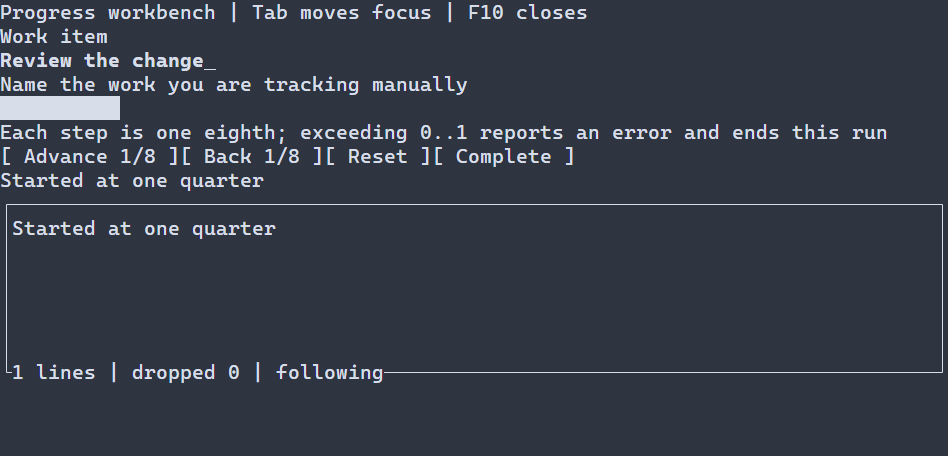
Progress workbench with the gauge at one quarter, controls and log.
// Copyright (c) 2026 ttldtor.
// SPDX-License-Identifier: BSL-1.0
#include <portals/ui.hpp>
#include <format>
int main() {
using namespace portals;
constexpr double STEP = .125;
ui::Ref<Gauge> progress;
ui::Ref<FormField> workItem;
ui::Ref<Label> status;
ui::Ref<LogView> history;
auto record = [=](std::expected<void, ManagedError> changed, std::string_view action) {
if (changed) {
history.append(std::format("{}\n", action));
}
return changed;
};
auto scene = ui::scene(ui::vbox(
ui::label("Progress workbench | Tab moves focus | F10 closes"),
ui::formField(workItem, "Work item", "Review the change", {.help = "Name the work you are tracking manually"}),
ui::gauge(progress, .25).width(40),
ui::label("Each step is one eighth; exceeding 0..1 reports an error and ends this run"),
ui::hbox(
ui::button("Advance 1/8").onClick([=] {
}),
ui::button("Back 1/8").onClick([=] {
}),
ui::button("Reset").onClick([=] {
}),
ui::button("Complete").onClick([=] {
})),
ui::label(status, "Started at one quarter"),
ui::logView(history, "Started at one quarter\n", {.limits = {.maxLines = 32}}).height(8)));
return scene
| ui::onKey(key::F10, ui::quit)
| ui::runApp();
}
Typed Widget observation; explicit composite specializations reuse their existing weak facades.
Definition ui_ref.hpp:761
TextProperty text(TextResolver resolver={}, std::source_location origin=std::source_location::current()) const
Definition ui_ref.hpp:1968
bool append(std::string_view bytes, std::source_location origin=std::source_location::current()) const
Definition ui_ref.hpp:1064
std::expected< RadioGroupValue, ManagedError > value() const
Definition ui_ref.hpp:782
std::expected< void, ManagedError > adjust(double delta, std::source_location origin=std::source_location::current()) const
Definition ui_ref.hpp:908
ui::ValueText text(std::format_string< const ui::detail::TextArgumentValue< Args > &... > pattern, Args &&...args)
Declare live formatted text over explicit scalar roots, fields or value properties.
Definition ui_value_text.hpp:567
Build portals_progress_workbench with PORTALS_BUILD_EXAMPLES=ON and run the executable in a terminal. See build setup and package setup.
Value and configuration
ui::gauge(progress, .25) publishes an observing ui::Ref<Gauge> after mount. The gauge owns its value. Between frames on the UI thread, progress.value(.5) replaces it and progress.adjust(.125) adds to it; both return std::expected<void, ManagedError>. A failed or out-of-range update leaves the previous value unchanged, and equal values request no redraw. Return the result from an action to propagate the error once, as the workbench does. Disabled gauges still accept programmatic writes. The gauge is presentation-only: it has no timer, independent keyboard or mouse action, or automatic model subscription. The scene owns it; the Ref does not extend its lifetime.
GaugeOptions has inclusive double minimum = 0, maximum = 1, std::int32_t preferredWidth = 10, PrimitiveGlyphs::UNICODE and std::size_t maxPaintCells = 16384. Intrinsic height is one. Bounds and value must be finite, minimum strictly less than maximum with finite span, and value within the inclusive range. Preferred width must be nonnegative and the cap positive; invalid settings fail with INVALID_ARGUMENT. The fill occupies floor(width × fraction) whole columns across the allocated height. Unicode uses ASCII # when the glyph is not one cell; explicit ASCII is also supported. An allocation above the area cap returns WOULD_BLOCK, including partial clipping.
Loaded scenes support Gauge and typed scene.get<Gauge>(...); the same Ref commands apply. A resource may set value and bounds, for example Gauge#progress { minimum=0 maximum=1 value=.25 }. See scene resources and command errors and lifetime.
Styling reference
The natural selector is Gauge; only normal and disabled are painted. Focused and selected do not produce separate gauge parts. foreground and background take #RRGGBB; bold, italic, underline take true or false. The common resolved style paints both the background and fill glyphs. There are no independent PSS track/fill colors or arbitrary fill string: choose Unicode/ASCII through GaugeOptions. Manual ControlStyle is the base beneath theme and application PSS; omitted attributes retain lower values.
Gauge { foreground: #62b4d7; background: #182028; width: 24; }
Gauge:disabled { foreground: #7d828c; }
Runtime PSS width/height accept nonnegative cells, auto, fit-content or flex(positive weight); min-width, max-width, min-height, max-height accept nonnegative cell bounds. Size selectors cannot include state or :read-only; conflicting bounds reject the update. Compile-time PSS supports min-width among these size properties. See primitive styling, layout and cascade.
See portals::Gauge, GaugeOptions, ui::gauge and ui::Ref<Gauge> for exact signatures.