Loading...
Searching...
No Matches
Show an animated loading indicator
Use Spinner for indeterminate work. The default is active DOTS, a 100 ms interval, forward direction, start alignment and an empty label; reduced motion is off. Its reference starts, stops or relabels the indicator, rather than receiving user input itself. See Spinner options and API.
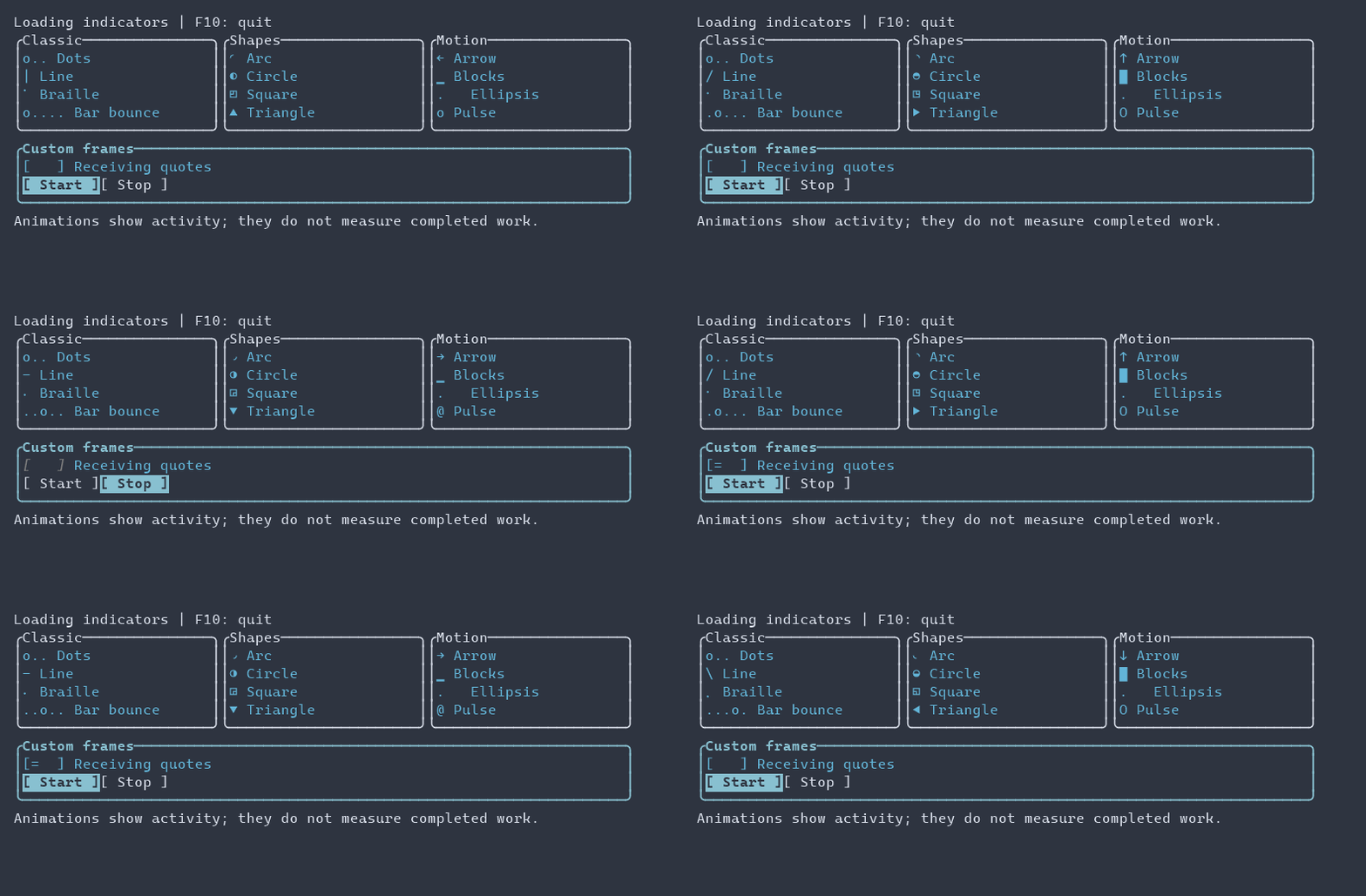
All twelve presets and an owning custom sequence animate together.
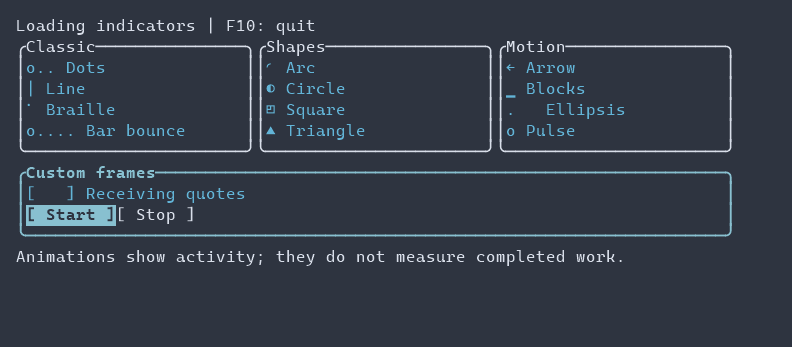
The three framed groups show every built-in preset. Start and Stop control the custom sequence below them. The indicator signals ongoing work; use Gauge when the completed amount is known.
Styling reference
Spinner uses normal for an active animation and its label. Inactive, ineligible or reduced-motion frames use :disabled; the label keeps its normal appearance. ControlStyle supplies manual defaults beneath the cascade. Use foreground, background (#RRGGBB), bold, italic, and underline (true or false); state-free rules apply to every variant. See cascade and size constraints for min-width, which requires a state-free selector.
Frames, direction, alignment and timing are spinner settings, not PSS parts; there are no independent trailing-segment colors. Presets and custom frames are described below.
| SpinnerOptions setting (not PSS) | Default / values |
|---|---|
| preset, frames | DOTS, empty custom source; presets below, nonempty LF-separated frames override preset |
| interval, direction | 100 ms, FORWARD; REVERSE is available |
| alignment | START; CENTER or END positions the indicator and label together |
| active, reducedMotion, label | true, false, empty text |
| maxFrames, maxFrameBytes, maxFrameCells | 64 frames, 4096 source bytes, 64 cells per frame |
| maxPaintCells | 16384 allocated cells |
Spinner:disabled { foreground: #808080; }
Use ui::spinner() for work whose completion percentage is unknown. The scene owns its timer and cleanup. This complete program compares twelve presets and controls a custom sequence without keeping a scheduler token:
1// Copyright (c) 2026 ttldtor.
2// SPDX-License-Identifier: BSL-1.0
3#include <portals/ui.hpp>
4#include <portals/ui_style.hpp>
5
9int main() {
11 ui::Ref<Spinner> transfer;
12
13 // clang-format off
14 return ui::scene(ui::vbox(
15 ui::label("Loading indicators | F10: quit"),
16 ui::hbox(
17 ui::vbox(
18 ui::spinner("dots").label("Dots"),
19 ui::spinner("line").label("Line"),
20 ui::spinner("braille").label("Braille"),
21 ui::spinner("bar-bounce").label("Bar bounce"))
22 .width(24).framed("rounded", "Classic"),
23 ui::vbox(
24 ui::spinner("arc").label("Arc"),
25 ui::spinner("circle").label("Circle"),
26 ui::spinner("square").label("Square"),
27 ui::spinner("triangle").label("Triangle"))
28 .width(24).framed("rounded", "Shapes"),
29 ui::vbox(
30 ui::spinner("arrow").label("Arrow"),
31 ui::spinner("blocks").label("Blocks"),
32 ui::spinner("ellipsis").label("Ellipsis"),
33 ui::spinner("pulse").label("Pulse"))
34 .width(24).framed("rounded", "Motion")),
35 ui::vbox(
36 ui::spinner().reference(transfer)
37 .frames({"[ ]", "[= ]", "[== ]", "[===]"})
38 .interval(120).label("Receiving quotes"),
39 ui::hbox(
42 .framed("rounded", "Custom frames"),
43 ui::label("Animations show activity; they do not measure completed work.")).maxWidth(72))
44 | ui::theme(nordTheme())
45 | ui::style("Spinner { foreground: #62b4d7; } Spinner:disabled { foreground: #808080; }")
46 | ui::onKey("F10 | Ctrl+C", ui::quit)
47 | ui::runApp();
48 // clang-format on
49}
Typed Widget observation; explicit composite specializations reuse their existing weak facades.
Definition ui_ref.hpp:761
std::expected< void, ManagedError > stop(std::source_location origin=std::source_location::current()) const
Definition ui_ref.hpp:980
std::expected< void, ManagedError > start(std::source_location origin=std::source_location::current()) const
Definition ui_ref.hpp:970
StyleSheet nordTheme()
Build portals_docs_loading_indicators with tests enabled. Use a terminal at least 72 columns wide and 12 rows high for the three-column gallery. Start is a no-op when already active. Stop cancels the pending tick; starting again keeps the current frame and waits one fresh interval. Ref<Spinner>::start(), stop() and label(...) are checked UI-thread commands. Their failures enter the ordinary scene error collector, so a simple button callback can ignore the returned expected; callers needing an immediate result can inspect it explicitly.
Select a sequence
| Preset | Compact name | Appearance | Frames |
|---|---|---|---|
| DOTS | "dots" | Moving ASCII dot | 3 |
| LINE | "line" | Rotating ASCII line | 4 |
| BRAILLE | "braille" | Eight braille dot positions | 8 |
| BAR_BOUNCE | "bar-bounce" | Marker crossing five cells and back | 8 |
| ARC | "arc" | Rotating corner | 4 |
| CIRCLE | "circle" | Rotating half-circle | 4 |
| SQUARE | "square" | Rotating marked square | 4 |
| TRIANGLE | "triangle" | Rotating triangle | 4 |
| ARROW | "arrow" | Changing arrow direction | 4 |
| BLOCKS | "blocks" | Rising and falling block height | 6 |
| ELLIPSIS | "ellipsis" | One, two, then three dots | 3 |
| PULSE | "pulse" | ASCII symbols changing apparent weight | 4 |
Use ui::spinner("arc"), .preset("arc") or .preset(SpinnerPreset::ARC). Names ignore ASCII case and treat hyphens and underscores equally. Unknown names produce a typed configuration error. Existing SpinnerOptions forms remain available.
Set .preset(...), .interval(150), .direction(SpinnerDirection::REVERSE), or .alignment(LayoutAlign::CENTER) on the recipe. Equivalent pipe modifiers use the same names. The interval is positive monotonic milliseconds; its default is 100. Horizontal alignment supports START, CENTER and END. Width and height use ordinary terminal-cell sizing and clipping.
An owning frame list is .frames({"[ ]", "[= ]", "[== ]", "[===]"}).interval(120). The recipe copies every frame before the call returns. An empty list restores the preset; an empty entry or a line break inside an entry is invalid. The existing LF-separated string form remains available.
For an owning custom single-row sequence, use .frames("[ ]\n[= ]\n[==]"). LF separates complete frames. The source cannot contain empty frames, carriage returns, terminal controls or a zero-width frame. Custom sources must be valid under the receiving width policy. Built-in Unicode presets use the complete four-frame ASCII LINE sequence when any glyph cannot occupy one cell under the receiving width policy. Custom frames are validated without substitution. This does not detect the installed font. BRAILLE now uses eight visible positions with no blank frame instead of its earlier four-frame cycle. A nonempty custom sequence overrides the preset.
The configurable defaults are 64 frames, 4096 total UTF-8 source bytes, 64 cells per frame and 16384 allocated paint cells. The corresponding methods are .maxFrames(...), .maxFrameBytes(...), .maxFrameCells(...) and .maxPaintCells(...). Invalid settings produce typed preparation errors.
Labels, styles and resources
The complete resource program declares a Spinner in configuration and connects buttons in C++. Build portals_docs_loading_resource with tests enabled and run it in a terminal.
// Copyright (c) 2026 ttldtor.
// SPDX-License-Identifier: BSL-1.0
#include <portals/ui_style.hpp>
int main() {
using namespace portals;
// clang-format off
return [] {
auto scene = ui::scene(R"(scene {
VBox {
Spinner#loading { preset = BRAILLE label = "Loading quotes" interval = 100 width = 30 }
HBox {
Button#start { "Start" }
Button#stop { "Stop" }
}
Button#exit { "Exit" }
}
})",
ui::SceneResourceOptions{.format = ui::SceneResourceFormat::CONFIGURATION});
return std::move(scene)
| ui::style("Spinner { foreground: #62b4d7; }")
| ui::onClick(start, [loading] { return loading.start(); })
| ui::onClick(stop, [loading] { return loading.stop(); })
| ui::onClick(exit, ui::quit)
| ui::onKey("F10 | Ctrl+C", ui::quit);
} | ui::runApp();
// clang-format on
}
One-line button; registration is an explicit caller-owned ActionBinding.
Definition controls.hpp:161
Retained indeterminate indicator using the receiving scene's existing scheduler. Construct through ui...
Definition spinner.hpp:115
DynamicRef get(std::string_view name, std::source_location origin=std::source_location::current())
Explicit resource-loader configuration; no process-global registry or locale. Configure without concu...
Definition ui_scene_resource.hpp:487
.label(...) accepts owning literal, formatted or localized TextValue input. The label follows the sequence with one space and contributes to its intrinsic width. ui::spinnerLabel(...) is the pipe form; ui::label(...) still creates an ordinary Label. Runtime loading.label(...) stages a checked replacement; it resets the animation to frame zero and restarts its interval. Localization uses the explicitly supplied resolver, as for the other text-reference commands. There is no implicit live locale or model subscription.
The default style type is Spinner. Ordinary foreground/background, bold, italic and underline rules use the current stylesheet and theme layers. Manual ControlStyle supplies the active and dim appearances; inactive and reduced-motion presentation use the disabled variant. Independent colors for trailing segments and multi-row animation shapes are not provided by this API.
Configuration resources use the same settings:
scene {
Spinner#loading { preset=arc label="Loading quotes" interval=100 width=30 }
}
preset, frames, interval, direction, alignment, active, reducedMotion, label, maxFrames, maxFrameBytes, maxFrameCells and maxPaintCells are canonical leaves. They compose with the existing common size, frame, identity and style properties. A label can use the existing i18n(...) resource resolver.
Animation lifetime
The managed indicator uses the existing scheduler and monotonic clock. It has at most one pending timer. Hidden, fully clipped, disabled, inactive and removed indicators do not continuously request frames. Layout and ordinary mutations resume eligible animation; the indicator does not poll for visibility. Resume does not replay missed ticks. .reducedMotion(true) renders frame zero without a timer. Closing the scene cancels its timer registrations.
A standalone low-level Spinner remains a static retained widget; managed scene construction supplies animation. Existing session constraints still apply: destroy the ManagedScene outside callbacks and tree frames, and keep the clock reader nonblocking and non-reentrant. Removing a widget from a supported callback does not require destroying its scene. See managed lifecycle.