Loading...
Searching...
No Matches
Protected passwords
Русская версия · LineEdit · Protected input details
Use ui::password for protected single-line values. A LineEdit password display only masks an ordinary plaintext model and history; it does not provide this protected storage contract.
A complete application
This program checks whether a value was supplied without copying its bytes into the status label. Type a value, Tab to Inspect and activate with Enter, Space or a left click; F10 exits. runApp reports errors and restores the terminal.
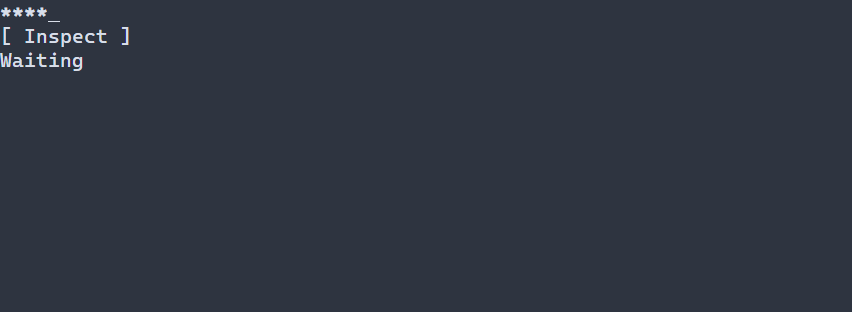
The password example shows a masked value, Inspect button and status.
// Copyright (c) 2026 ttldtor.
// SPDX-License-Identifier: BSL-1.0
#include <portals/ui_password.hpp>
int main() {
using namespace portals;
ui::PasswordRef password;
ui::Ref<Button> inspect;
ui::Ref<Label> status;
// clang-format off
return ui::scene(ui::vbox(
ui::password(password).placeholder("Password"),
ui::button(inspect, "Inspect"),
ui::label(status, "Waiting")))
| ui::onClick(inspect, [password, status] {
return password.withPlaintext([status](SecretView value) {
});
})
| ui::onKey("F10", ui::quit)
| ui::runApp();
// clang-format on
}
Synchronous read-only byte borrow, valid only during its callback.
Definition secure_string.hpp:195
Typed Widget observation; explicit composite specializations reuse their existing weak facades.
Definition ui_ref.hpp:761
TextProperty text(TextResolver resolver={}, std::source_location origin=std::source_location::current()) const
Definition ui_ref.hpp:1968
Build portals_docs_password with PORTALS_BUILD_TESTS=ON and run it in a supported native terminal. See build setup and package setup.
Values and editing
ui::PasswordRef observes the scene-owned control. withPlaintext lends a SecretView only for the synchronous callback: do not retain its pointers. value() returns a checked protected PasswordValue identity; value(value) applies a protected candidate between frames. A copied identity may retain an old encrypted snapshot until its last owner releases it. Read-only blocks user edits but allows the explicit setter. No ordinary plaintext getter, copy/cut or undo history is provided.
Default PasswordOptions::editMode is IMMEDIATE; ON_COMPLETION commits on Enter, activation or blur, and EXPLICIT on Enter or activation. Escape adopts the latest model for a deferred draft; it cannot undo already published immediate edits. A conflicting external revision cannot silently overwrite a dirty deferred draft. Keyboard editing uses routed actions and text input. Mouse selection is not implemented; paste is disabled unless pastePolicy is explicitly ENABLED.
The default display uses one ASCII * per grapheme and reveals the count. .noEcho() hides value, placeholder and selection glyphs, uses intrinsic width one and fixes the caret at the origin. PasswordOptions::limits defaults to {4096, 4096, 4096, 8192} and securePolicy.maxBytes to 4096; both apply without truncation. Protected native storage and idle encryption are required on Windows or Linux; unsupported guarantees are rejected, including the native policy on WASM. Plaintext input buffers and a synchronous borrow are outside the protected value's idle storage. See editing and security limits.
Resources may declare Password#password { text = "", placeHolder = "Password" } or omit text. Nonempty text literals and text-resource expressions are rejected; provide secrets through typed state or a checked provider. The complete resource example uses scene.get<Password>("password"); see resource details.
Styling reference
The natural selector is Password. Normal/focused/disabled paint the field, selected paints the enabled selection, and caret paints the focused enabled caret. Header is not painted. With no-echo there are no value or selection glyphs, although the focused caret remains. PasswordOptions::style is ControlStyle, while selection and cursor are CellStyle; manually, selection defaults to bold italic and cursor to bold underline, with terminal colors. PSS cannot change the mask glyph or reveal the value.
| Property | Values and effect |
|---|---|
| foreground, background | #RRGGBB; foreground and fill |
| bold, italic, underline | true or false; explicit false overrides a lower layer |
| width, height | Nonnegative cells, auto, fit-content, flex(positive weight) in runtime PSS |
| min-width, max-width, min-height, max-height | Nonnegative cell bounds; only min-width also works in compile-time PSS |
Size declarations cannot depend on a state or :read-only; conflicting bounds reject the update and retain the last valid style and geometry. See layout. Manual ControlStyle uses terminal-default colors, normal text, bold focus and italic disabled text. Theme and PSS rules override individual fields; unspecified fields retain lower-layer values. See the cascade.
Password { min-width: 16; }
Password:focused { background: #245070; }
Password:selected { background: #426080; }
Password:caret { underline: true; }
See portals::Password, PasswordOptions, PasswordValue, SecretView and ui::PasswordRef for exact contracts.