Loading...
Searching...
No Matches
Theme selector
Use the theme selector to preview, apply or restore a catalog choice through a modal view. ui::Ref<ThemeSelector> observes the view; the default opening shortcut is Ctrl+K, Ctrl+T, and Apply and Cancel are ordinary controls. The application supplies the catalog and handles persistence. See ThemeSelector options and API.
For a loaded scene, register a code-owned native factory with its semantic schema; the resource does not supply executable callbacks or a catalog. See resource registration.
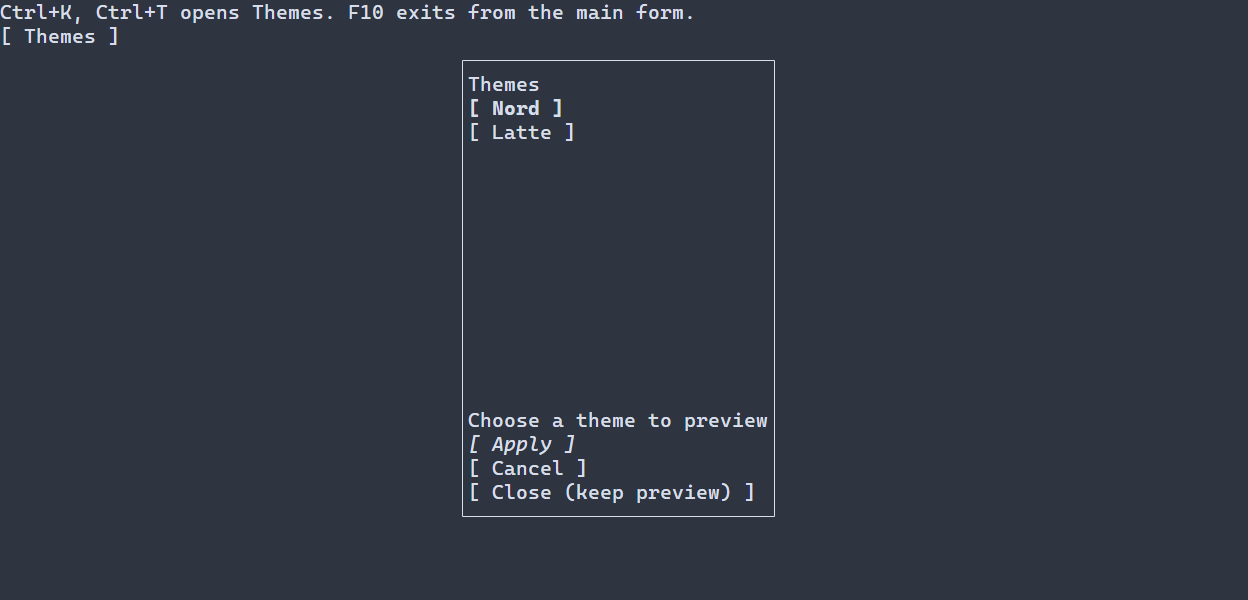
Theme selector with Nord and Latte choices and Apply and Cancel controls
Styling reference
The chooser is composed of existing dialog and button controls. Style the dialog parts as described in the dialog reference; catalog choice buttons have the Button.theme-choice target. The Apply, Cancel and recovery buttons use the ordinary Button target; status labels and choice descriptions use Label without dedicated classes. A broad Button or Label rule also affects those parts. No separate PSS role distinguishes an individual service button. Do not rely on generated child IDs. Ordinary foreground, background, bold, italic and underline declarations and state-independent min-width follow the cascade and size constraints. Buttons use their ordinary control states; application and user layers remain above the previewed theme.
Button.theme-choice:focused { background: #305070; bold: true; }
ui::themeSelector supplies a modal catalog view for the checked theme-selection model. The view owns its list, preview actions and recovery controls. It uses the existing dialog, focus and key-binding machinery. Application and user style overrides remain in place.
Complete native example
Open Themes with the button or Ctrl+K, Ctrl+T. Moving through the choices previews a theme. Apply keeps it; Cancel restores the saved theme. F10 exits from the main form. The modal dialog handles its own cancellation keys.
1// Copyright (c) 2026 ttldtor.
2// SPDX-License-Identifier: BSL-1.0
3#include <portals/ui.hpp>
4
8int main() {
10
11 // clang-format off
12 return [] {
13 ui::Ref<ThemeSelector> selector;
14
15 return ui::scene(
16 ui::column(
17 ui::label("Ctrl+K, Ctrl+T opens Themes. "
18 "F10 exits from the main form."),
19 ui::button("Themes", [selector] {
20 return selector.open();
21 })),
22 ui::themeSelector(selector, {
25 | ui::onKey("F10", ui::quit);
26 } | ui::runApp();
27 // clang-format on
28}
Typed Widget observation; explicit composite specializations reuse their existing weak facades.
Definition ui_ref.hpp:761
StyleSheet nordTheme()
StyleSheet catppuccinLatteTheme()
The program builds as portals_docs_theme_selector and is also included in the installed-package consumer. Its main function contains no replay transport or terminal emulator. Enable tests for the source-tree target and run the resulting executable in a terminal.
Composition and commands
Declare the selector as a scene layer with ui::scene(body, selectorRecipe) and pass its choices directly to ui::themeSelector(reference, choices). The scene owns the model and view. No separate model reference or installation stage is required. A second model installation is rejected with a typed setup error.
For catalog limits, text resolution or an initial choice, pass an owning ui::ThemeSelectorCatalog. Its choices field contains the same entries; selection uses the existing ThemeSelectionOptions. For a synchronous factory, optional initialId previews and commits that choice after scene configuration and before selector publication. Startup selection does not invoke onCommitted. A failed initial choice follows the normal setup-error and cleanup path before terminal entry. With ui::Scene, the initial factory runs in that scene's preparation context. A collected short command failure prevents committing the initial choice and publishing the selector. Already completed application actions are not rolled back. Prepared worker factories defer the initial choice until the executor is ready; see prepared themes. Their startup errors use runtime diagnostics and leave the previous theme active.
The explicit ui::ThemeSelectionRef overload and ui::themeSelection stage remain available for applications supplying their own model or controls. Model and view must belong to the same scene. Attachment follows scene configuration; mixing a default catalog with a second explicit installation is an error.
ui::Ref<ThemeSelector> observes the scene-owned view; the legacy ui::ThemeSelectorRef remains supported. Copying either reference does not keep the scene or controls alive. Its checked commands return std::expected<void, ManagedError>:
| Command | Behavior |
|---|---|
| open() | Opens or refocuses the view; opening alone invokes no theme factory. |
| apply() | Commits the selected active preview, invokes the optional callback once, then attempts to close. |
| cancel() | Restores the saved theme before attempting to close. |
| closeKeepingPreview() | Hides the view without applying or restoring the preview. |
The same reference provides checked preview(id) and commit() for programmatic theme changes through its existing model. commit() promotes an active preview; it does not invoke onCommitted, close the view or replace lastApply(). Use apply() for the selected UI choice and its callback/close outcome. snapshot() returns the model's owning immutable catalog and authority snapshot. These operations require an attached live view. Snapshots already returned remain readable after retirement; the reference does not keep the model alive.
Escape and an outside click use checked cancellation. A restoration failure keeps the view usable. Close (keep preview) is an explicit recovery action when restoration is unavailable. Closing this way leaves the model's preview session active; it does not claim to have cancelled it.
Commands alone do not report an error or stop the application. Returning a checked result from an application handler uses the runner's normal error policy. The selector's built-in actions report recoverable failures through the existing diagnostics mechanism and leave recovery controls available.
Options and successful application
ThemeSelectorOptions provides owning captions, text limits, an optional text resolver, the existing DialogOptions, openingShortcut and onCommitted. The default dialog is centered, modal, 60 by 20 cells with a one-cell margin. The default opening shortcut is Ctrl+K, Ctrl+T; std::nullopt disables it. Retiring the view retires its shortcut, including an unfinished sequence.
Opening requires attachment, a completed layout pass and a valid arranged host viewport. prepareChecked() alone does not perform that layout pass. The available panel must be at least 4 by 9 cells after the dialog's margin and maximum-size constraints. Smaller geometry returns a checked error. The list reserves space for its scroll bars so a narrow window does not lose its last content cell to a gutter. Use the ordinary style layers to customize the dialog and buttons; application/user rules remain above the previewed theme.
onCommitted is an optional synchronous UI-thread callback returning exactly std::expected<void, ManagedError>. Its ID argument is borrowed only for the duration of the call. Copy it if it must be retained. The library performs no file I/O. Do not block the UI callback.
A callback failure does not undo the successful commit or skip the close attempt. lastApply() returns an owning immutable ThemeApplyOutcome with the committed ID, actual close disposition and separate full callback and close errors. If both fail, apply() returns the callback error first; the outcome preserves both. The metadata remains readable after view retirement. Before a committed application it is null; a precommit failure preserves the earlier outcome. A callback is not repeated merely to retry closing.
Closing can publish successfully and then fail during focus notification. In that case the outcome says CLOSED; the selector does not reopen itself to simulate rollback. An error before close publication leaves it OPEN.
External changes and limits
A successful external theme change supersedes the preview even if the colors are equal. The open view updates through the existing invalidation path. Apply is unavailable until a fresh explicit preview; ordinary cancellation cannot overwrite the newer external theme. The recovery action can still hide the view while preserving the current appearance.
Catalog and style budgets come from the model and style engine. The selector does not create a second catalog, polling timer, theme registry or scheduler. Ordinary nullary factories and persistence callbacks run synchronously on the UI thread and must remain nonblocking. Use ui::preparedTheme for expensive factory work. Theme importers and automatic configuration-file persistence are separate features.