Loading...
Searching...
No Matches
Form fields
Русская версия · Control examples · Editing modes
Use a form field when an editor needs a persistent label, optional help and a validation message. It is a composition rather than a whole-form transaction. See FormField options and API; the default help is empty, required is false, and the default required message is A value is required. The full account-settings program below is the runnable example.
A FormField groups a label, an editor, help text and a readable validation message. The scene owns the composition. Ordinary text fields create their internal editor state; applications do not keep binding tokens or synchronize the captions manually.
For fields of the selected model record, use a record edit session so drafts and history follow their original records.
Account settings example
The complete program edits a display name and an email address, demonstrates a custom checkbox editor, checks the fields and restores initial text on request. It keeps values for the current session; it does not write an account or file. The email rule is a small example heuristic, not a complete email-address parser.
Build the portals_form_field_example target with examples enabled, then run the resulting executable in a terminal. Tab moves between editors and buttons; F10 closes the scene and the standard runner restores the terminal.
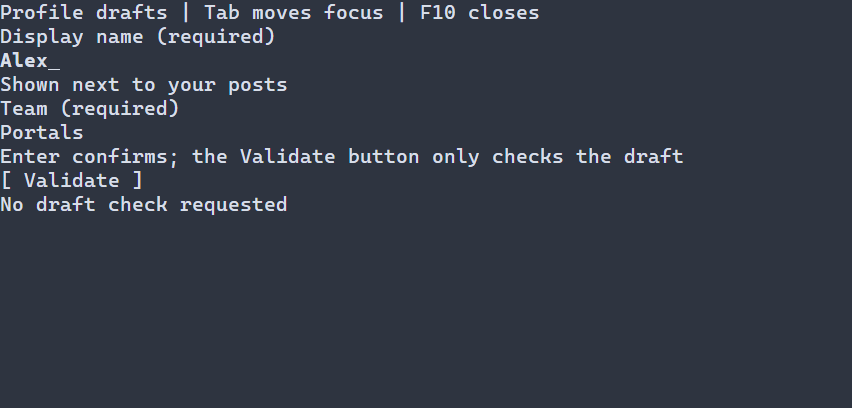
Profile drafts composition with two required fields and validation action.
// Copyright (c) 2026 ttldtor.
// SPDX-License-Identifier: BSL-1.0
#include <portals/ui.hpp>
using namespace portals;
FieldValidation emailRule(std::string_view candidate) {
const auto at = candidate.find('@');
if (at == std::string_view::npos || at == 0 || at + 1 == candidate.size()) {
}
}
int main() {
ui::Ref<FormField> name;
ui::Ref<FormField> email;
ui::Ref<Label> status;
auto form = ui::scene(ui::vbox(
ui::label("Account settings | Tab moves focus | F10 closes"),
ui::formField(name, "Display name", "Alex", {.help = "Shown next to your posts", .required = true}),
ui::formField(email, "Email", "alex@example.org",
{.help = "Checked when you press Enter or leave the field; drafts remain editable",
.required = true,
.validate = emailRule,
.editor = {.options = {.editMode = EditMode::ON_COMPLETION}},
.appearance = {.messageStyle = {.normal = {.bold = true}}}}),
ui::formField("Updates", ui::checkbox("Send release announcements", true),
{.help = "A custom editor uses the same label/help composition"}),
ui::hbox(
ui::button("Validate").onClick([=] {
if (!name.valid()) {
(void)name.focus();
return;
}
if (!email.valid()) {
(void)email.focus();
return;
}
status.text() = "Form valid";
}),
ui::button("Reset draft").onClick([=] {
name.text() = "Alex";
email.text() = "alex@example.org";
status.text() = "Draft restored; Enter confirms the email editor";
})),
ui::label(status, "Edit a field to see its normal publication policy")));
return std::move(form)
| ui::onKey(key::F10, ui::quit)
| ui::runApp();
}
Typed Widget observation; explicit composite specializations reuse their existing weak facades.
Definition ui_ref.hpp:761
std::expected< void, ManagedError > focus(std::source_location origin=std::source_location::current()) const
Definition ui_ref.hpp:1895
TextProperty text(TextResolver resolver={}, std::source_location origin=std::source_location::current()) const
Definition ui_ref.hpp:1968
bool valid(std::source_location origin=std::source_location::current()) const
Definition ui_ref.hpp:2222
@ ON_COMPLETION
Keep a draft until Enter, programmatic activation or focus loss.
Definition line_edit.hpp:29
Owning validation presentation; messages remain meaningful without color.
Definition form_field.hpp:25
static FieldValidation invalid(std::string message={})
static FieldValidation valid(std::string message={})
Validation and editing
An ordinary field uses the existing LineEdit editing policy. Required fields reject an empty publication candidate before running a custom synchronous rule. The rule returns an owning FieldValidation: acceptance or a rejection message. It does not run during layout, painting or stylesheet resolution.
- IMMEDIATE is the default: editing checks candidates through the existing publication path. A rejected intermediate draft stays visible.
- ON_COMPLETION checks when editing completes through Enter or focus loss.
- EXPLICIT checks on explicit confirmation. Losing focus preserves the draft.
The editor retains its normal Undo/Redo, selection, Unicode and external-update rules. A field does not introduce a form transaction or change Enter/Escape semantics. See the editor contract.
Refs and explicit checks
ui::Ref<FormField> observes the composition. Inside a managed callback, field.valid() checks its current text draft and updates the message. It returns false for a validation rejection; technical failures go to the existing scene diagnostics. This operation does not publish the draft or add an Undo entry. Use validate() when code needs to inspect the checked result explicitly.
validation() reads the most recent presentation without running a rule. Deferred editing can retain its previous message until the next check. FieldValidation::pending(...) is explicit presentation only: it does not disable the editor, launch a task or provide an asynchronous completion endpoint.
Custom editors and limits
The custom-editor overload accepts an ordinary ui::Description<T> and uses the same label/help/message layout. It does not assume that a checkbox or another custom editor has string validation semantics. Standard text operations require a text editor; inappropriate operations report a checked error.
Callbacks remain C++ declarations when a field is loaded from a scene resource. The standard text-editor overload also supports the explicit asynchronous rule below. Custom-editor validation and transactional whole-form submit/reset are separate features; a manually displayed pending message launches no work.
Loaded scene
The resource variant declares two required text fields, including an explicit editor. Standard FormField registration is built in. Captions, initial text, help and required settings stay in the resource; the button action remains C++. This program demonstrates required checks, not the email rule in the C++ form.
// Copyright (c) 2026 ttldtor.
// SPDX-License-Identifier: BSL-1.0
#include <portals/ui_style.hpp>
int main() {
using namespace portals;
auto scene = ui::scene(R"scene(
scene {
VBox {
Label { "Profile drafts | Tab moves focus | F10 closes" }
FormField#name {
label="Display name"
text="Alex"
help="Shown next to your posts"
required=true
}
FormField#team {
label="Team"
text="Portals"
help="Enter confirms; the Validate button only checks the draft"
required=true
requiredMessage="Enter a team name"
editMode=EXPLICIT
}
Button#check { "Validate" }
Label#status { "No draft check requested" }
}
}
)scene",
{.format = ui::SceneResourceFormat::CONFIGURATION});
// clang-format off
return scene
| ui::style("Button:focused { bold: true; }")
| ui::onClick(check, [name, team, status] {
if (!name.valid()) {
static_cast<void>(name.focus());
return;
}
if (!team.valid()) {
static_cast<void>(team.focus());
return;
}
status.text() = "Both drafts meet their required rule";
})
| ui::onKey(key::F10, ui::quit)
| ui::runApp();
// clang-format on
}
One-line button; registration is an explicit caller-owned ActionBinding.
Definition controls.hpp:161
const GraphemeText & text() const
Inspect the control's owning Unicode text on UI.
Retained label/editor/help/message composition using the ordinary vertical layout....
Definition form_field.hpp:73
Noninteractive Unicode label; text remains data, including control characters.
Definition controls.hpp:142
DynamicRef get(std::string_view name, std::source_location origin=std::source_location::current())
Validate a text field on a worker
Set FormFieldConfig.validateAsync for an expensive semantic rule. The complete account-name program keeps the ordinary editor, checkbox and exit button usable while a reserved-name check runs on the application's bounded executor:
// Copyright (c) 2026 ttldtor.
// SPDX-License-Identifier: BSL-1.0
#include <portals/ui.hpp>
#include <array>
#include <stop_token>
#include <string_view>
std::expected<portals::FieldValidation, portals::TreeError> accountName(std::string_view candidate,
std::stop_token stop) {
static constexpr std::array RESERVED{
std::string_view("administrator"), std::string_view("api"), std::string_view("billing"),
std::string_view("help"), std::string_view("operator"), std::string_view("root"),
std::string_view("security"), std::string_view("support"), std::string_view("system")};
for (const auto name : RESERVED) {
if (stop.stop_requested()) {
return std::unexpected(portals::TreeError::CLOSED);
}
if (candidate == name) {
}
}
}
int main() {
using namespace portals;
// clang-format off
return [] {
return ui::scene(ui::vbox(
ui::label("Account directory | Tab moves focus | Enter checks | Esc restores | F10 closes"),
ui::formField("Account name", "", {
.help = "The model changes only after the background directory check",
.required = true,
.editor = {.options = {.editMode = EditMode::ON_COMPLETION}},
.validateAsync = accountName}),
ui::checkbox("Send release announcements", true),
ui::button("Exit", [] { ui::quit(); })))
| ui::onKey(key::F10, ui::quit);
}
| ui::runApp();
// clang-format on
}
@ CLOSED
The owning tree or source is closed.
Definition widget_types.hpp:31
The worker receives the candidate's UTF-8 bytes, borrowed for that invocation, and a cooperative stop token. Its captures must own immutable, worker-safe data; do not capture a scene, UI reference, mutable model or editor storage. Return FieldValidation::valid(...), FieldValidation::invalid(...), or an exact TreeError. Other presentation statuses are not final worker results. Required checks and ordinary synchronous rules run first and must stay short.
Editing modes still determine when publication is requested. IMMEDIATE checks accepted edits; ON_COMPLETION checks Enter or focus loss; EXPLICIT checks only explicit confirmation. Pending work writes no model value. A valid completion uses the normal editor publication path, including a fresh external-model check. Undo/Redo and fluent text changes use that same gate; a successful completion does not create another edit or clear history. Enter while already pending shares the current request. An obsolete result cannot replace a newer draft, even when the text changed away and back to the same bytes.
Escape, a new baseline, removal or scene close retires the intent without joining a worker. Cancellation is cooperative: a rule must not perform unbounded blocking work. External model changes retain the draft and report a conflict instead of silently accepting an old result. Read-only or disabled editors cannot publish an asynchronous completion.
validation() exposes PENDING, VALID, INVALID or TECHNICAL_ERROR. Invalid business data keeps the draft. Transport, allocation and worker failures also keep it and use existing typed scene diagnostics; they do not masquerade as an invalid account name. A new publication request can retry a failed check. The synchronous validate()/valid() command cannot await this rule and reports INVALID_ARGUMENT before starting work. Use the editor's normal publication commands instead.
validationLimits defaults to 16 KiB per candidate and 4 KiB per result message. These positive byte budgets are configurable and separate from editor limits; there is no silent truncation. An oversized draft remains visible and undoable. This worker path supports the standard normal-display text editor. Password and no-echo configurations reject asynchronous attachment during checked mount; custom editors keep their existing explicit presentation contract.
Styling reference
FormField is a layout root. Its label, help and validation message are Label.form-field-label, Label.form-field-help and Label.form-field-message; the editor is the supplied widget, normally LineEdit. Target each child separately. Labels are not focus targets by default and use normal/disabled presentation; the editor uses normal/focused/disabled, with LineEdit also painting selected and caret. Validation status does not create a PSS state. FormFieldAppearance::labelStyle, helpStyle and messageStyle are ControlStyle manual defaults; layout is LinearOptions and policy is SizePolicy. Help and validation labels may be hidden until needed. Required text and validation messages are configured as content, not glyph properties.
The common paint properties apply to each painted target:
| Property | Value |
|---|---|
| foreground | #RRGGBB text/ink color |
| background | #RRGGBB fill color |
| bold | true or false |
| italic | true or false |
| underline | true or false |
Manual ControlStyle defaults use terminal colors, normal text, bold focus and italic disabled text. Theme and PSS declarations override individual manual fields; unspecified fields retain lower-layer values, including explicit false. A selector without a state supplies all variants. See cascade and selectors and styles.
Layout properties width and height accept nonnegative cell counts, auto, fit-content, or flex(positive weight); min-width, max-width, min-height, and max-height accept nonnegative cell counts. They require selectors without state or :read-only; Except for min-width, these size declarations are runtime PSS only. Conflicting widget bounds reject the update and retain the previous style and geometry; constraints and recipe precedence are explained in layout. These affect allocation, not the glyphs themselves.
Label.form-field-label { bold: true; }
Label.form-field-help { italic: true; }
Label.form-field-message { foreground: #ff7777; }