Loading...
Searching...
No Matches
Model workspaces: selection, drafts and reading places
Русская версия · Model capabilities · Application setup
Start with one model and one navigation context. Bind every view that should follow the same current record to that context. A form edits the selected record through an edit session; application code does not shuttle fields between widgets.
The examples below are complete applications. Build them with C++23 and portals::core as described in Connecting an application. The programs contain their scene, handlers and cleanup. The recordings use separate test infrastructure; none of it is part of the application sources.
One value, several captions
The complete counter binds an integer field of one record model to a label, a button caption and a frame title. Incrementing that field updates all three through their bindings, without assigning three strings.
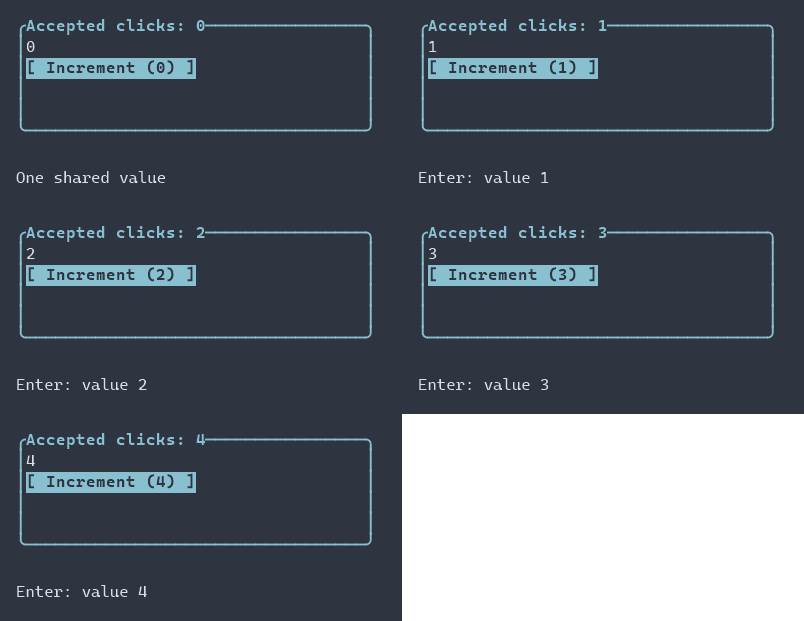
One integer updates a label, button caption and frame title
Value models also shows an owning Region record and distinguishes changing a value from replacing a view's source. Rebinding one Label changes that view; the shared navigation used below coordinates a group of collection views.
A small list and table
Complete source declares two collections and shares one navigation context between a city list and an order table. F2 and F3 choose the source. Returning to a retained source restores its current record and reading place. Both views may have different column widths and viewport geometry.
auto navigation = ui::navigation(europe, {.readingAnchor = true});
Pass that same navigation to ui::virtualList and ui::virtualTable. navigation.model(asia) collects admission errors through the scene; navigation.setModel(asia) returns a checked result when a handler must react. Rejected admission keeps the old group. A later asynchronous source read failure belongs to the accepted new binding; admission does not promise successful I/O.
Source replacement and its limits explain the full program and source-dependent captions.
A city orders workspace
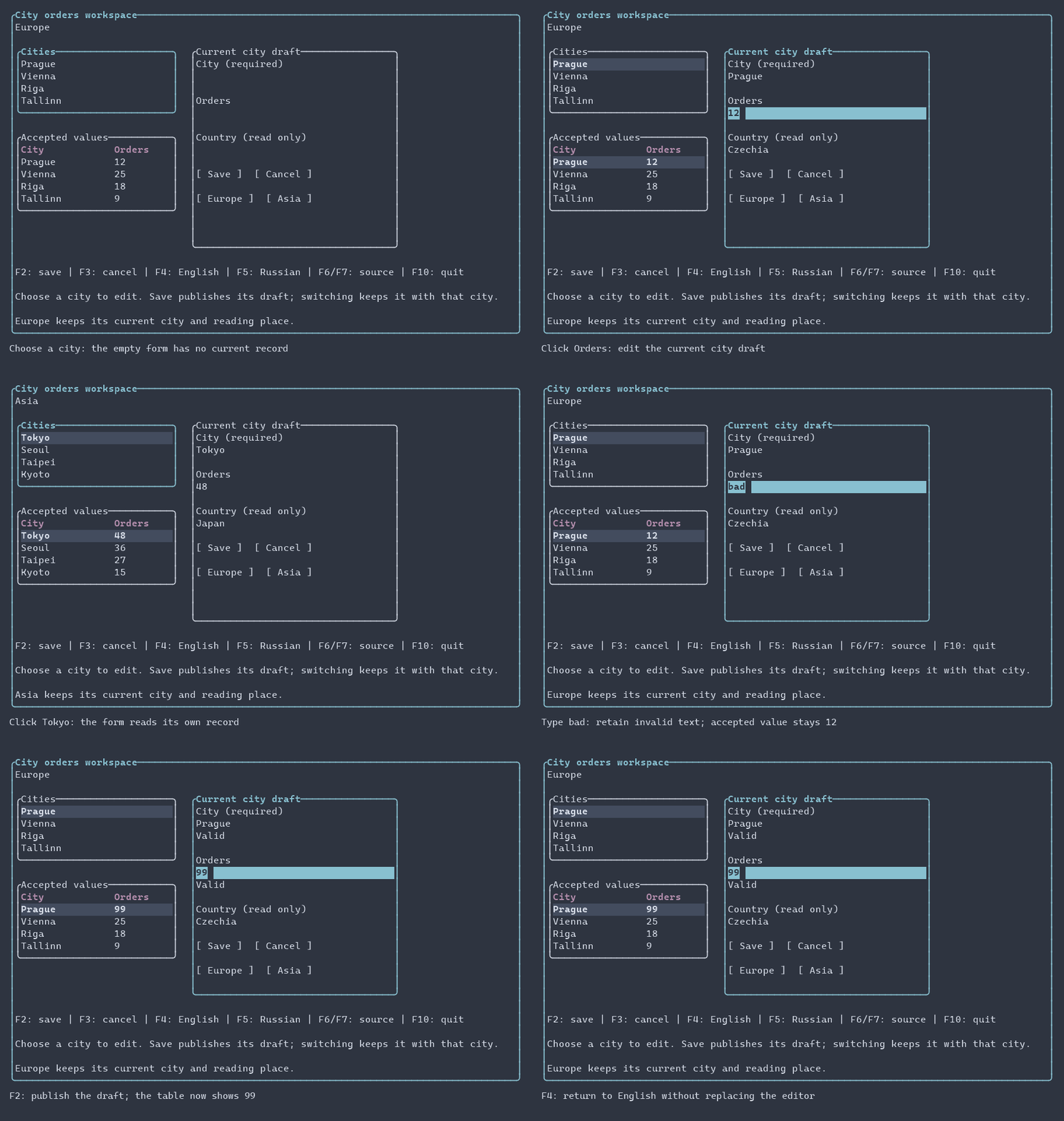
One navigation context connects the city list, accepted values and editable draft
Complete source combines a list, table and form:
- Cities selects the current record with a click or Up/Down. Before selection, the form is empty and inactive. Wheel scrolling changes the reading position; it does not silently select a different city.
- Accepted values shows model data. Editing Orders leaves that table unchanged until Save accepts the draft.
- Current city draft edits the required name and nonnegative order count. Country is readable and blocks user editing.
- Europe and Asia, or F6 and F7, replace the source for the shared navigation. Return to Europe to recover its place and the draft of the same city.
- F2 saves the current record; F3 cancels its drafts. F4 and F5 change the Orders caption through the existing i18n resolver, without replacing the editor.
Region is an enum, not another mutable text label. ui::bySource<City, Region> maps the accepted resource to that enum; two labels format it independently. There is no second variable that can drift away from the installed source.
The form uses EXPLICIT mode. Its drafts and Undo/Redo histories belong to exact resource, record and field identities. Moving current changes what is displayed; it does not retarget an earlier write request. Save submits per field and is not a multi-field transaction. Conflicts, deleted records and pending replies require the record edit session contract; an orphan draft is never committed to the nearest surviving city. The example uses immediate in-memory endpoints; it does not simulate an external server or manufacture a conflict.
Typed form declarations and customization explain validators, read-only presentation, codecs and field limits.
Different ordering, the same record
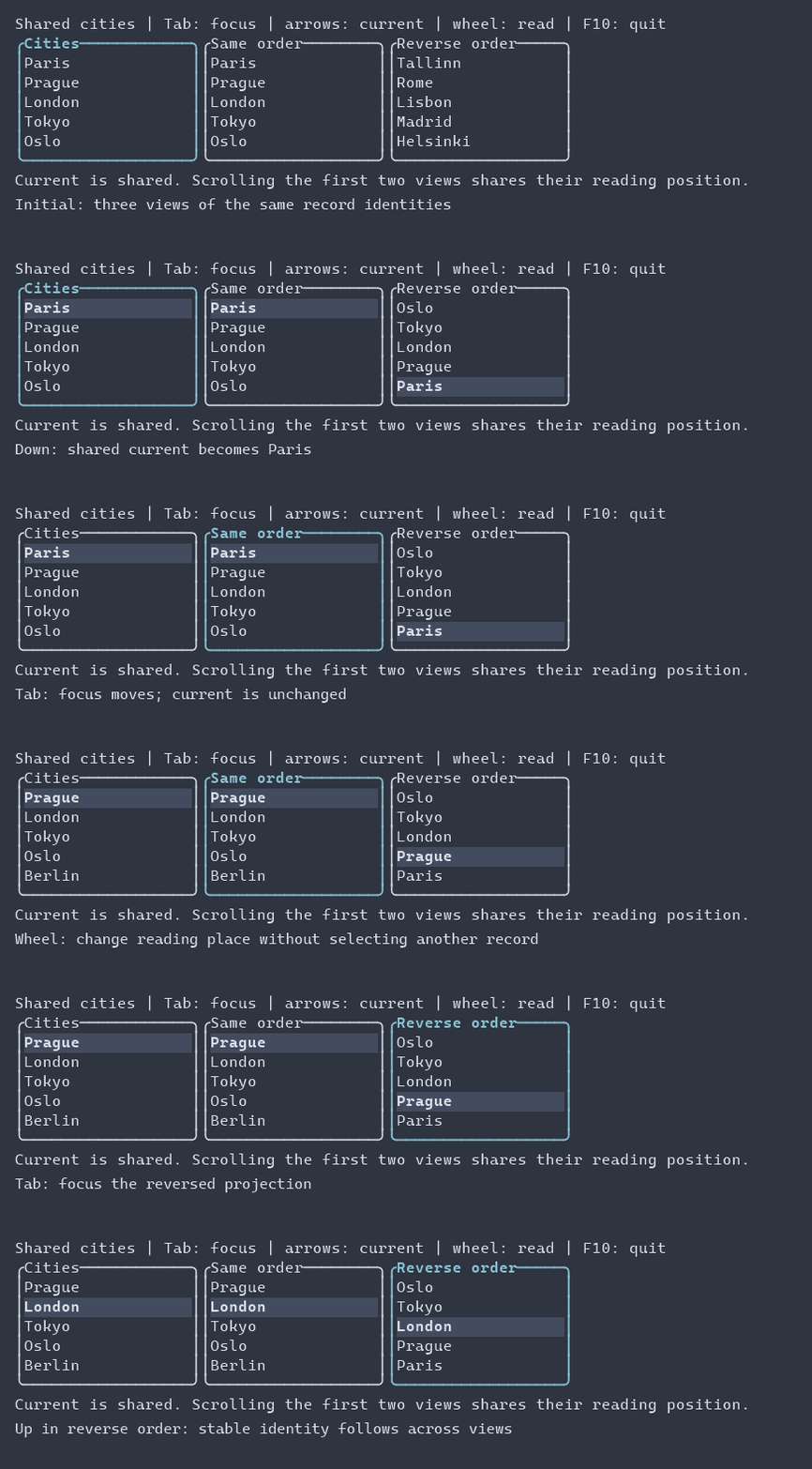
Three differently ordered views follow stable record identities
Complete source shares current across three lists. The first two also share their reading anchor. The third uses a reversed model that deliberately preserves the original row identities.
Ordinary consumers use the cold navigation descriptor directly. The reversed projection uses one checked configure binding with NavigationProjection::PRESERVES_ROW_IDS. This explicit agreement is needed: equal row numbers in unrelated models do not establish shared record identity. The scene constructs both provider snapshots inside its checked factory. cityList reuses the formatter and viewport as an ordinary view recipe. Its formatter converts this sample's fixed ASCII names directly to grapheme text; it does not apply an additional format pattern. The recipe uses the default WidthPolicy; a view using a different width policy needs a matching formatter.
Read one log, switch, then return
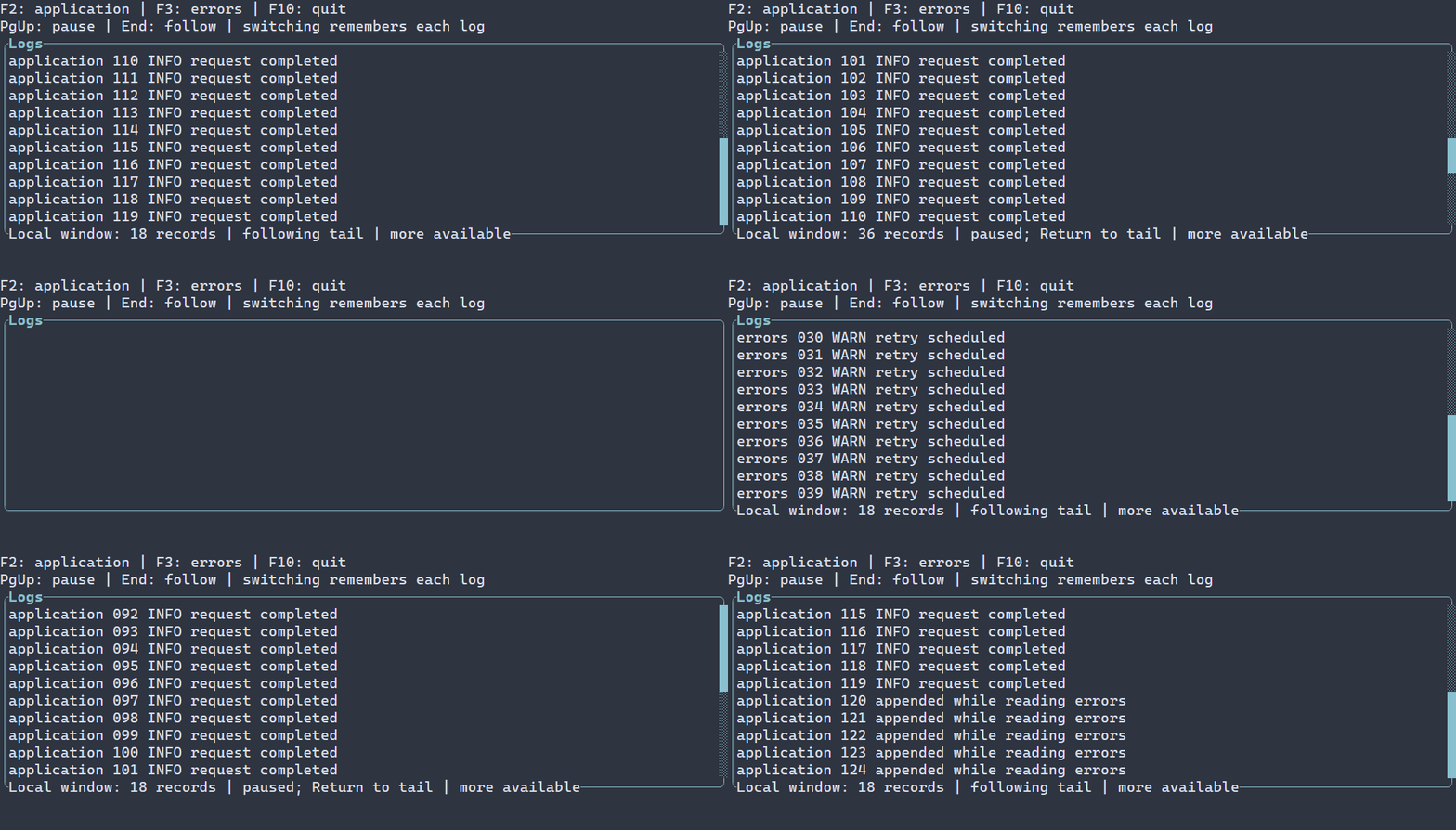
Pause one file, switch sources, then return to the saved record or follow the tail
File-backed source switching keeps one LogView and two retained source descriptors. PageUp pauses following; F2/F3 choose a log; End follows the available tail again. A paused file returns to its saved record after switching away and back, including when new records were appended. The complete program expects application.log and errors.log in its working directory. It contains no generator or recording driver.
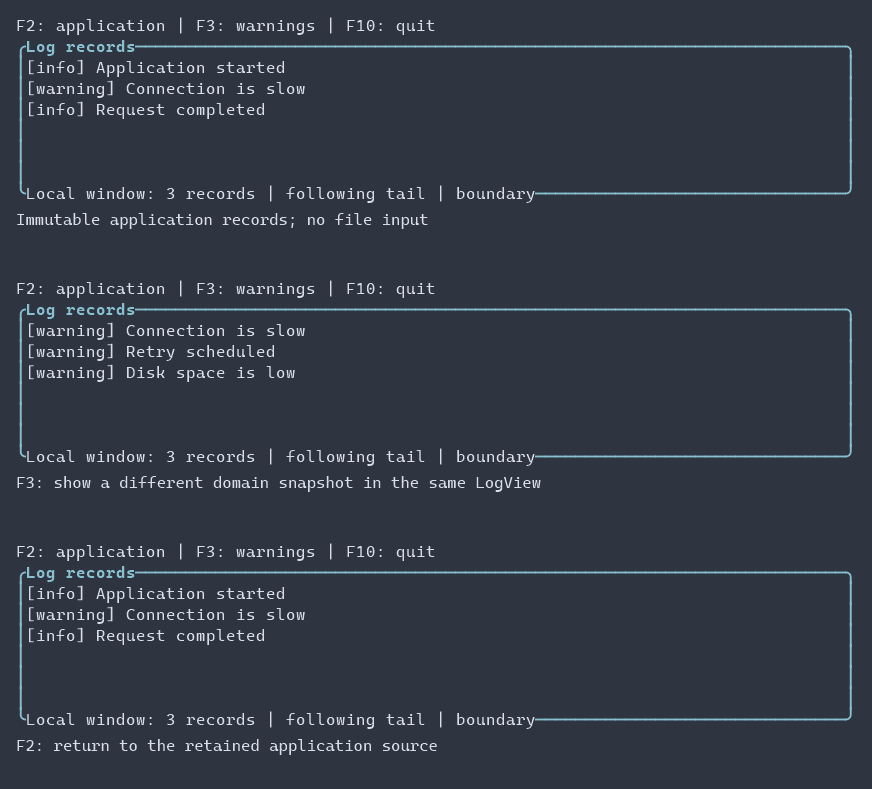
Read-only application records and warnings use a non-file source
A read-only domain model uses the same LogView with finite immutable records and a worker-side formatting callback. It reads no files and exposes no writing capability. Its exact count is a capability of that particular snapshot, not a requirement imposed on every log source.
For a source whose count is unknown, use the existing WindowProvider<LogLine> contract. Readiness, available tail and final end remain distinct; a viewport does not redefine the capabilities of the underlying model. LogView source contracts describe bounded loading, retention, bookmarks, rotation and shared budgets. Slow reads and formatting run on the application worker path.
A document outlives its view
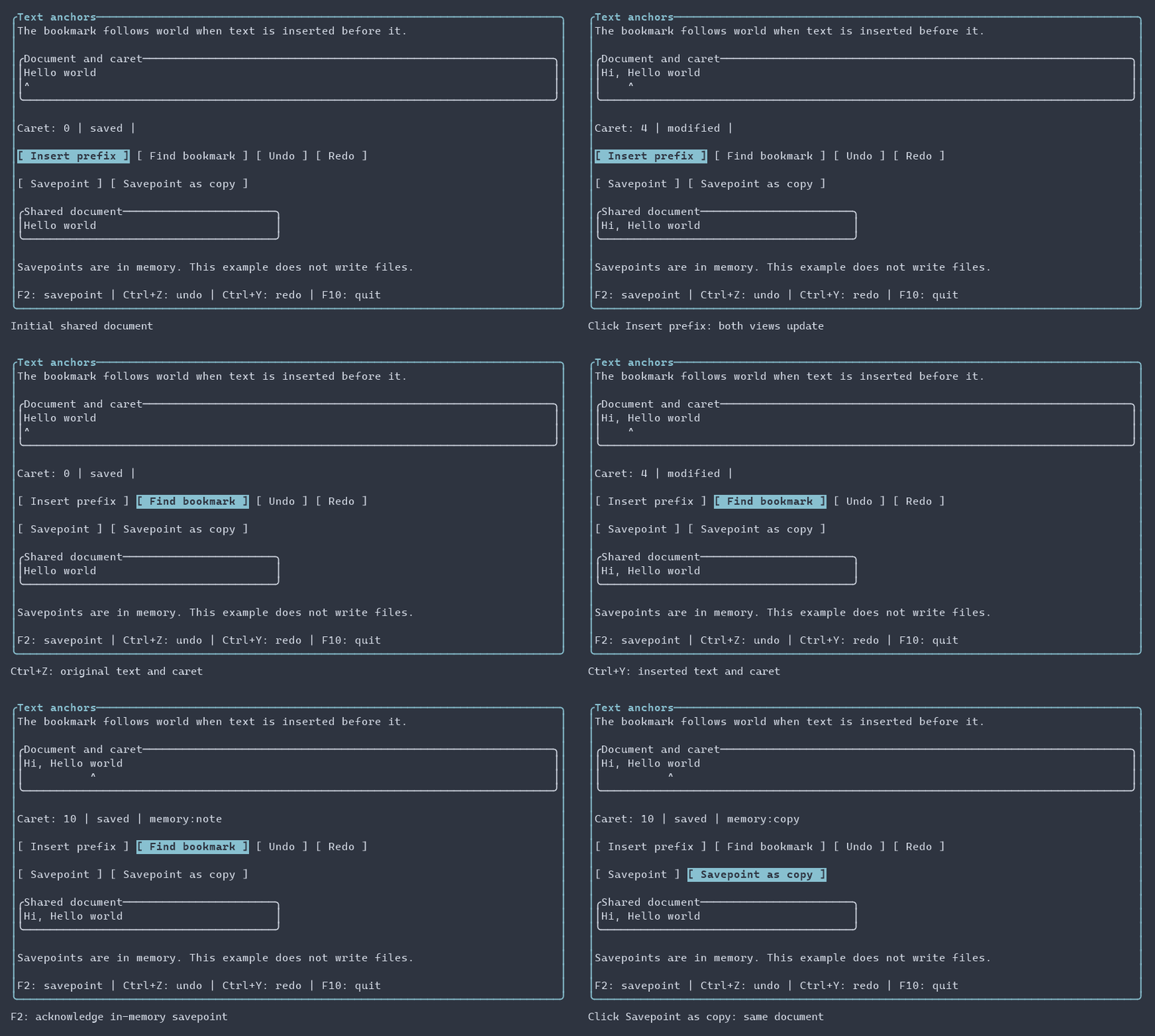
Bookmarks follow edits while savepoints keep their own content identity
Complete source keeps text, caret, history and a bookmark in a finite document session. Insert a prefix, restore the bookmark, then use Undo/Redo. A savepoint records a content state and a logical save target; it does not write a file. Changing that target keeps caret and selection.
Portable reading places are a separate operation: an explicit provider codec exports position metadata for a reopened resource. The checkpoint contains no document text, draft, Undo history or write permission. The current finite editor defaults to 4096 bytes/graphemes. These examples do not claim to implement a windowed editor for an arbitrarily large field.
Customize presentation without duplicating state
Keep the source, navigation and edit declarations unchanged when changing the layout. .width, .height, .minWidth, .maxWidth and .framed configure the view's geometry; they do not load that many records into the model or replace its total count. The examples title each work area so accepted data and drafts remain distinguishable.
Use PSS layers and theme parameters for colors and control states, and frame and scrollbar styles for their individual parts. For a compact starting point, add this ordinary layer to a scene:
| ui::style("Button { bold: true; }")
Model updates and model replacement serve different purposes. Publish new data through the existing source when a feed advances. Replace a binding when the user chooses another source. A market-data feed tick is an update; choosing a different instrument is a potential source change. The UI does not need a new binding for every price revision.